

The duration of medication and prescription use can be queried through e-Government (e-Devlet). Thanks to intensive digital integration efforts by the Social Security Institution and the Ministry of Health, almost our entire medical history—medication use, doctor appointments and more—can now be managed on online platforms. In addition to e-Devlet, the E-Nabız system also allows full management of health records.
E-Nabız is a service provided by the Republic of Turkey Ministry of Health that allows citizens to view and manage their personal health information via a web page and mobile app. One of the primary features of this application is the ability to check medication and prescription usage periods.
Other features available through E-Nabız include:
- Entering personal data such as height, weight, age and chronic conditions to assess potential health risks.
- Accessing Covid-19 related information (vaccination records, test results, quarantine periods, vaccine card, etc.).
- Volunteering for inactivated Covid-19 vaccine trials developed in collaboration with the Turkey Health Institutes Presidency and Erciyes University.
- Receiving information and advice on existing and potential conditions through the Smart Assistant system.
- Viewing visits to health institutions, visit dates and reasons under the “My Visits” section, and providing feedback to help improve services.
- Viewing details of medical reports under “My Reports,” including dates, reasons and validity.
- Accessing information about previously diagnosed conditions—both ongoing and resolved—under the “My Diseases” section.
- Viewing laboratory test results by selecting a date range under “My Tests,” eliminating unnecessary repetition of tests when visiting different doctors or institutions.
- Accessing all previous radiological images with dates and facility information in the “My Radiological Images” section.
- Viewing allergy information, insurance transactions, vaccination schedules and appointment calendars, among other personal health data.
How to Find Out Medication Usage Period?
Medication usage periods can be found through e-Devlet. When a physician prescribes medicine, they inform the patient or a caregiver about dosage and duration. For those who forget or did not receive this information, it is now possible to check it online. Through e-Devlet or E-Nabız, you can access prescribed medications, usage durations, the prescribing doctor and prescription dates, among other details.
If online access is not available, pharmacies that dispensed the medications can also provide this information. Pharmacies can look up a patient’s medication, dosage and usage duration by searching with the patient’s Turkish ID number in their system.
How to Query Medication Usage Period?
Medication usage period queries can be performed via e-Devlet and E-Nabız. Users who wish to use E-Nabız must first log in to their E-Nabız account. After logging in with personal details, the Ministry of Health’s system provides access to an individual’s full medical history, including past treatments, examinations and prescribed medications.
Through this system you can also create doctor appointments and receive health advice. E-Nabız became especially important during the Covid-19 pandemic. As services moved rapidly online, the Ministry of Health developed a comprehensive system to ensure quick and easy access to health services.
To check prescriptions and medication usage periods in E-Nabız, log in and click the “My Prescriptions” tab on the left. The most recently issued prescription will appear with its date and time, prescription number, type and the prescribing physician. Users can also click the red “Show More Results” link to view earlier prescriptions.
Clicking the blue “View Details” option next to a prescription reveals detailed information about the medications listed on that prescription.
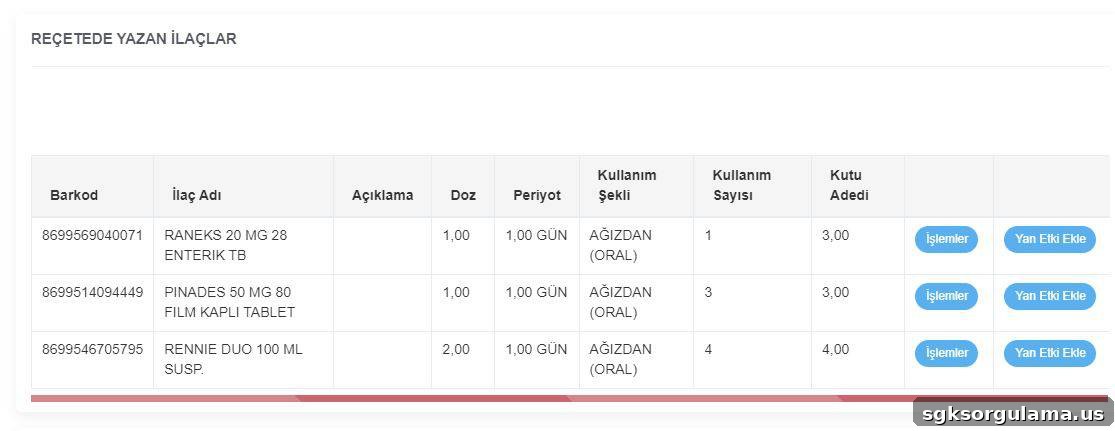
Information available about a medication in this section includes:
- Barcode number
- Medication name
- Notes written by the physician
- Dosage information
- Recommended frequency of use
- Method of administration
- Number of doses
- Prescribed package quantity
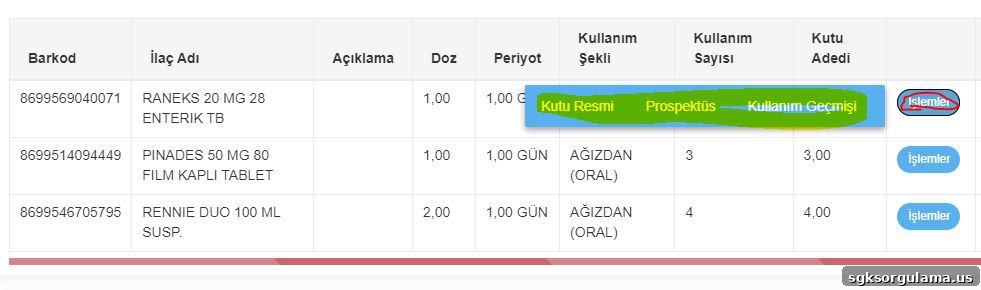
- Photo of the medication box
- Medication prospectus
- Medication usage history
On the right side of this section, users can click the blue “Add Side Effect” button to record any effects the medication caused. Reported side effects serve as references for pharmaceutical companies and ensure that future doctors are informed during subsequent visits. This helps prevent repeat prescriptions of a medicine without awareness of past adverse effects.
Can Medication Usage Period Be Queried from e-Government?
Yes, medication usage periods can be queried through e-Devlet. After logging in with personal credentials, use the e-Devlet search to access the Social Security Institution (SGK) page. From there, go to the “4A/4B/4C Medication Usage Period Inquiry” section. If you have active medications, they will be displayed in a report. To view historical medications, their usage periods, prescription dates, prescribing physicians and pharmacies, click “All Medications List” to display a full report.
How to Learn Prescription Usage Period?
Prescription usage periods can be learned through the online platforms of the Social Security Institution and the Ministry of Health. You can check this information via e-Devlet or the E-Nabız application.
Several SGK-connected services are available within e-Devlet for checking prescription information:
- e-Prescription / Prescription Information Inquiry: View recent e-prescription details created by physicians and processed in pharmacies.
- Medical Prescription Information Inquiry: Check SGK prescriptions and contribution amounts for medical supplies such as adult diapers, medical consumables, hearing aids and ready orthoses/prostheses.
- Medula Optical Prescription Information Inquiry: View details related to Medula optical prescriptions.
- Reçetem Application: Redirects to Ministry of Health’s E-Nabız system to access prescription information.
How to Query Prescription Usage Period?
Prescription usage details are accessible from the E-Nabız system by clicking the prescription entry. Information on how, in what doses and at what intervals medications should be used is provided there. From the E-Nabız main page, select “My Prescriptions” on the left. The list of prescriptions will appear with issue dates and the prescribing doctor. Clicking a prescription reveals a blue “Operations” button on the right; clicking that button displays all prescription details.
Can Prescription Usage Period Be Queried from e-Government?
Yes, prescription usage period queries are available on e-Devlet. Enter “Prescription” in the e-Devlet search bar to see a list of related services. Selecting the appropriate application will display all details for the prescription. Additionally, prescription and medication usage periods can be checked in detail via the Ministry of Health’s E-Nabız application, including prescription date, medication prospectus, administration instructions, barcode required for pharmacy dispensing and the prescribing physician’s details.