

You can check your CİMER application either through the e-Government (e-Devlet) portal or directly on CİMER’s official website. By querying, you can learn the outcomes of applications you previously submitted. CİMER stands for Presidency Communication Center (Cumhurbaşkanlığı İletişim Merkezi). You can forward complaints or requests related to public institutions and municipalities to CİMER. With the CİMER application inquiry service, you can follow up on those submissions and see their results.
CİMER is not only a place to submit complaints. The types of requests you can make through CİMER include:
- Earthquake Emergency
- Request
- Thank You
- Participate in Governance
- Right to Information
- Opinion / Suggestion
The way CİMER handles and resolves issues can be summarized as follows:
- CİMER reviews your submission.
- It forwards your request to the authorized institution.
- The relevant institution takes the necessary steps to resolve the issue.
- If the matter falls under another institution’s jurisdiction, it is redirected accordingly.
- The complainant receives the necessary information about the process and the outcome.
How Can I Access CİMER?
To access CİMER, you can use the e-Government system or go to the CİMER website. To log into e-Government, you must have previously obtained a password. You can obtain your e-Government password from PTT branches. After receiving your password, it is recommended to set a more secure password so you can use the e-Government services without issues.
You may also sign into e-Government using an electronic signature. Mobile signature and the Turkish ID card (T.C. identity card) are also supported login methods. Alternatively, you can access CİMER directly at www.cimer.gov.tr. All transactions you perform via e-Government can also be conducted on CİMER’s website.
CİMER supports quick resolution of problems you encounter with public institutions. Submitting requests via CİMER is important for ensuring your demands are addressed. CİMER also provides special support in emergencies; during natural disasters such as earthquakes, a dedicated application screen is opened for urgent matters that need immediate attention.
Checking a CİMER Application via e-Government
To check a CİMER application through e-Government, visit the turkiye.gov.tr portal. After logging in, you will be prompted for your identity number and password. Enter these credentials to access the system.
On the displayed screen, you will see the date and time of applications you previously submitted. You will also see the application reference number associated with each submission.
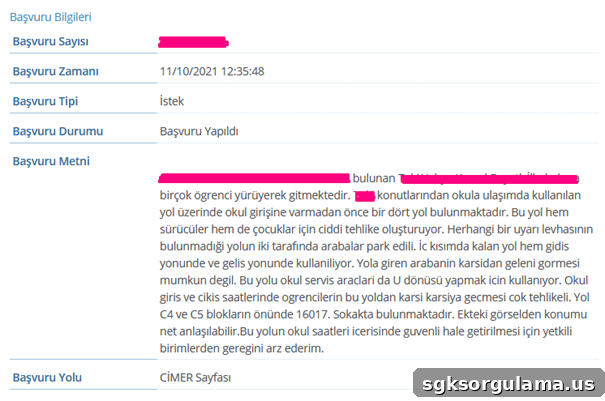
Clicking the “Details” link lets you view the text of your application. The details section also shows when you submitted the application and the type of application.
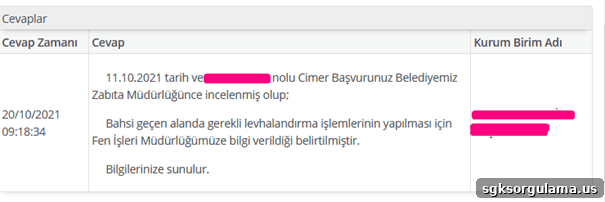
Below the application text, you will find the list of actions taken. This part shows what the relevant institution did in response to your application, including the dates and times of those actions and which institution performed them.
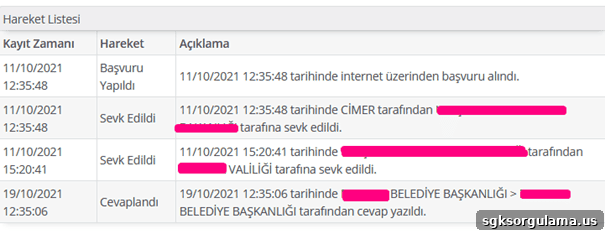
At the end of the details section there is an activity log. This log briefly explains the steps taken, showing the dates when the application was received, forwarded, and answered.
Checking a CİMER Application from the Official Website
To query a CİMER application, go to cimer.gov.tr. On that page, you will see a panel on the right side of the homepage similar to the one shown below. Click the part labeled “Query CİMER Application” to begin.
After clicking “Query CİMER Application,” you will be asked to provide several pieces of information. These details include:
- T.C. Identity Number
- First and Last Name
- Date of Birth
- Identity Series Number
- Mobile Phone Number
After filling in the requested information, click “Send Confirmation Code.” An approval code will be sent to your phone. Enter that code to proceed with your inquiry.
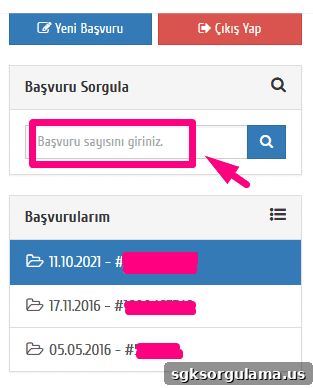
Once logged into the CİMER system, a list of your previous applications will be displayed. Click on the application you want to view for details. If you have many submissions, you can filter by entering the number of the application you want to check.
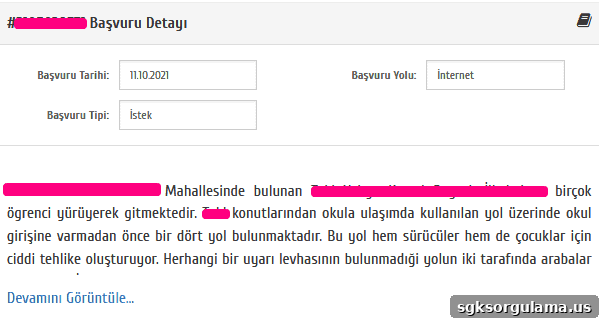
Application details appear as shown above. The screen displays the application type, date, and submission method. You can re-read the content you entered in the application text and, if the case has been closed, view the outcome details.
How to File a CİMER Complaint — Illustrated Guide
To file a complaint with CİMER you may log in via e-Government or access CİMER directly. From e-Government, click the “New CİMER Application” or “Go to Application” option to be redirected to the CİMER interface.
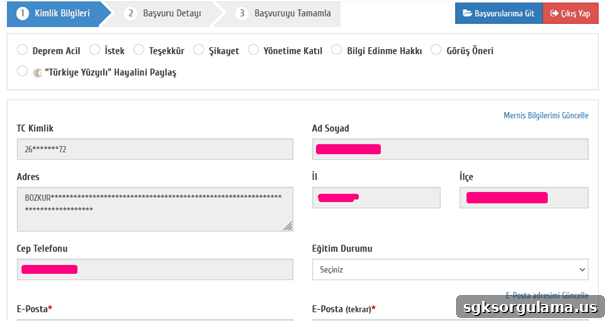
On the opened screen, your personal information will be shown. You will need to provide your email address and education level if requested. After entering these details, confirm the GDPR/Personal Data Protection notice (KVKK) to continue.
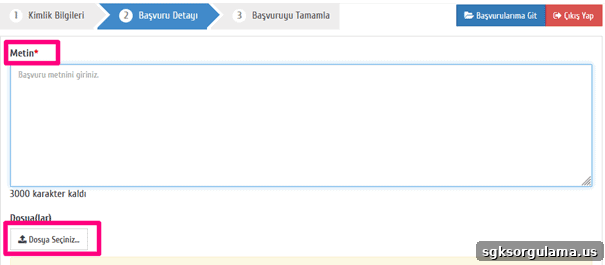
In the text area provided, explain the details of your request or complaint. If relevant, you can attach images that support your claim by clicking “Select File.” After completing all required fields, submit and confirm your application.
When Will I Receive a CİMER Response?
The time to receive a CİMER response varies depending on the type of application. In general, applications are completed within 15 or 30 days. If the process cannot be concluded within that timeframe, you will receive an interim response. Once the procedure is fully completed, you will be notified of the final decision.
How to View the CİMER Reply
To view CİMER’s reply, you must log into e-Government. You can also use the e-Government mobile app or access cimer.gov.tr to track your application. Only fully completed applications will have a reply available to view; pending applications do not display a final response. Because processing can take up to 30 days, check the system periodically to see if a result is available. Depending on the application type, some requests can be concluded in 15 days.
To avoid delays and ensure a single-step resolution, describe your request clearly and completely. In the application text, express all complaints and requests in a straightforward and detailed manner. When necessary, attach supporting images to make the situation clearer. Also be certain about which institution is responsible for the issue.
How to Cancel a CİMER Application
To cancel a CİMER application, call 150. This number connects you to the CİMER call center. It is not possible to cancel an application via e-Government, so you must complete cancellation by phone through 150.
What Can Be Reported to CİMER?
Complaints to CİMER should concern public institutions and related matters. This includes municipalities and universities. Some entities cannot be reported to CİMER. These are:
- Chief Public Prosecutor’s offices
- Court bodies
- The Grand National Assembly of Turkey (TBMM)
- The Ombudsman Institution (Kamu Denetçiliği Kurumu)
- The Supreme Election Council (YSK)
- The High Council of Judges and Prosecutors (HSYK)
- The Court of Accounts (Sayıştay)
- Associations and foundations
- Private companies
- Village/neighborhood heads (muhtars)
You may submit requests regarding other public institutions to CİMER. If you do not receive a timely response to your request, you may file a new request via CİMER. If there is still no reply, you can pursue administrative legal action; the deadline to file such a lawsuit is 60 days.
In some cases, your submission may not be processed. Reasons include unclear or insufficient information, lack of concrete evidence, missing required details, or failure to follow the prescribed submission method. You can easily perform CİMER application inquiries and submit new applications online.
Sample CİMER Complaint Petition
A CİMER complaint petition should be written in Turkish when submitted in Turkey. Choosing the correct application type is important when preparing your petition.
Available application types for citizens include:
- Request
- Complaint
- Report (Tip-Off)
- Opinion / Suggestion
- Right to Information
Request: select this when your subject concerns a concrete demand or service request.
Complaint: choose this option when you have been aggrieved and suffered material or moral harm due to the issue in question.
Report (Tip-Off): if you are a witness to an offense or an incident that affects public order or the community, you may file a report.
Opinion / Suggestion: use this for recommendations aimed at improving a public service; this category is advisory in nature.
Right to Information: choose this category if you seek information about the rights, responsibilities, or duties held by public institutions.
Filing a CİMER Application by Phone
One way to submit a CİMER application is by phone. Applicants can call the ALO 150 line to communicate their requests to authorized personnel. Calls made to CİMER are answered within the provincial governor’s office. Staff will record the application and may ask guiding questions to clarify and register the request.
- Applicants who use ALO 150 retain the right to keep their identity information confidential for any request, complaint, report, opinion, suggestion, or right-to-information application.
The complaint may be directed immediately to the relevant institution or forwarded to the Directorate of Communications for preliminary review.
CİMER Complaint Hotline Number
The CİMER complaint hotline number is ALO 150. Calls to the center are handled by personnel authorized by the provincial governorship.
How to Write a CİMER Petition
When preparing a CİMER petition, remember that your submission is addressed to an official institution.
- Petitions should be written in an official tone and in clear language.
- Avoid slang, insults, and offensive language.
- Address the petition to the relevant institution.
- Describe the incident in a clear, chronological narrative.
- Use the final section of the petition to state your specific request clearly.
Avoid unnecessary details in any petition; state your request clearly and succinctly. A focused and understandable petition helps the process move faster.
If you attach documents, they should support the subject of your application. If attached documents do not match the content of the application or contain insults, the petition may not be processed. Files that are too large to upload electronically can be sent by post.
How Many CİMER Applications Can Be Submitted?
The daily limit for CİMER applications submitted electronically or by phone is one application per person. The character limit for texts submitted electronically is 1,500 characters. Applications sent by mail, fax, or delivered in person are accessible only to authorized users of the receiving institution.
CİMER staff are regularly informed and trained to act in accordance with applicable regulations and to protect personal data from unauthorized disclosure.
How Many Days Until a CİMER Result Arrives?
The institution responsible for responding to the application is expected to reply within at most 30 working days. If the process will take longer, the applicant must be informed with an interim decision. If the request concerns a document or information, the standard CİMER response time is 15 days. This period may be extended up to 30 days if:
- The requested information or document must be obtained from another institution, or
- The request involves multiple institutions. In such cases, the applicant must be kept informed of the extension.
CİMER’s responsibility covers administrative and public management bodies within the executive branch of the state. These include the Presidency and affiliated institutions, ministries, governorships, district governorates, universities, metropolitan municipalities, and provincial and district municipalities and administrations. Courts, the Grand National Assembly (TBMM), the Ombudsman Institution, the Supreme Election Council, the High Council of Judges and Prosecutors, and the Court of Accounts are outside CİMER’s scope.