

For people living in big cities, reaching the institutions where you need to complete transactions is often not easy. Sometimes these offices are not centrally located and require multiple transfers to reach. On top of that, you will frequently encounter long queues at the institution you visit, which can be the main source of frustration. You also need to pay attention to working hours: outside of business hours you will not be able to find an available official to help. Fortunately, technology is advancing in the service sector to improve people’s quality of life. As a result, people no longer have to waste time unnecessarily and can complete transactions using fast, practical methods.
One sector that benefits from these practical methods is banking. With a large share of the service market, banking is now used by nearly every citizen who is eighteen or older. In response to growing demand, systems have been developed that allow people to complete transactions in seconds instead of spending hours in line. An important institution in Turkey that uses these services is PTT. PTT now meets many banking needs more securely than other banks. Below we provide detailed information about PTT’s PTT Online İşlemler (PTT Online Services) option.
PTT Online Transactions
With PTT Online Transactions you no longer need to wait in long queues at PTT branches. Using the PTT Online Transactions platform, you can complete virtually any transaction online quickly and easily. Although ATMs are another practical option, online services minimize wasted time even more. Through the PTT Online Transactions menu you can perform EFT and money transfers, foreign currency transactions, top up mobile operators with TL, pay bills, set up automatic payments, and many other transactions with just a few clicks. The steps required are simple.
All you need to use PTT Online Transactions is an internet-connected smartphone or computer. First, visit PTT’s official website. Click the PTT Online Transactions link located in the top right corner of the page. A menu will open with several tabs; select the PTT Internet Banking tab. The page you see will look like this.
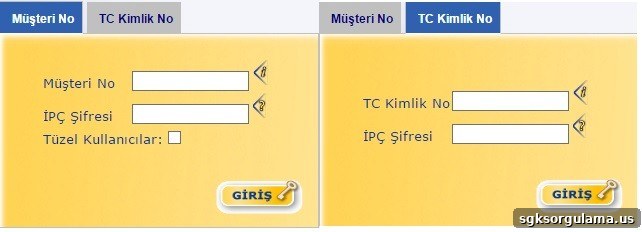
You can also access this section by clicking the link provided at the end of this article. When you open the PTT Internet Banking page, the login area on the left side of the image appears first. To log in from this area, enter your Customer Number and IPÇ password and click the “Giriş” button. If you are logging in as a corporate user, be sure to select the “Tüzel Kullanıcılar” option.
If you click the tab labeled “TC Kimlik No” in the upper left of the login screen, the login area on the right side of the image will appear. From there, enter your Turkish ID Number (TC Kimlik Numarası) and IPÇ password, then click “Giriş” to sign in.
After logging in via either method, you can take advantage of all the features and conveniences offered by the PTT Online Transactions platform.