
The MHRS appointment process can be completed online, through the mobile app, or via the E-Nabız system. MHRS stands for the Central Physician Appointment System. Launched in 2010, this system allows people to schedule examinations more easily without waiting in registration lines. Those who make an MHRS appointment can go directly to the relevant clinic for their examination without stopping at the registration desk.
WHERE CAN I BOOK AN MHRS APPOINTMENT?
You can book an MHRS appointment at mhrs.gov.tr or via the MHRS mobile app. Appointments are also available through the E-Nabız system or the MHRS call center.
Information required when booking an appointment:
- T.C. identity number
- E-Government (E-Devlet) or MHRS password
- E-Government or E-Nabız password
Booking a Hospital Appointment via the MHRS Website
To book a hospital appointment on the MHRS website, go to mhrs.gov.tr. You can enter the address directly in your browser or find the site through a search engine.

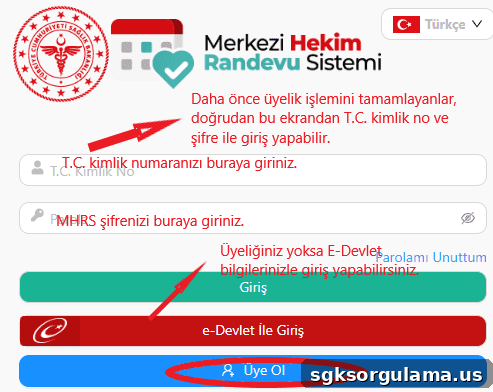
On the MHRS homepage, there is a button to start the appointment process. Click the “Randevu Al” (Make Appointment) option to open the appointment area. You will then be asked to enter your membership information.
At this stage you have three options:
- Users who already have an MHRS account can log in with their identity number and password on the login screen.
- Use the E-Government login option to sign in with your T.C. identity number and E-Government password.
- Click “Üye ol” (Register) to create an MHRS account.
After logging in, you will see three choices on the next screen:
- Book a vaccination appointment
- Book a family physician appointment
- Book a hospital appointment
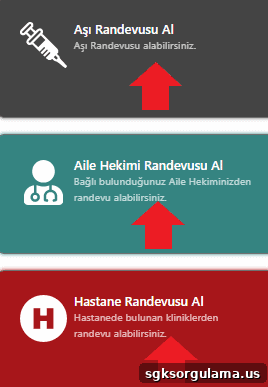
Choose the option that matches your need. For routine issues that do not require a specialist, select a family physician. For COVID-19 or other vaccinations, choose “Aşı Randevusu Al” (Book Vaccination Appointment).
When you click “Hastane Randevusu Al” (Book Hospital Appointment), you will be offered two search methods: general search and location-based search. If you are unsure which hospitals are nearby, select “Konuma Göre Arama” (Search by Location) to see the closest hospitals. If you want an appointment at a specific hospital, choose “Genel Arama” (General Search).
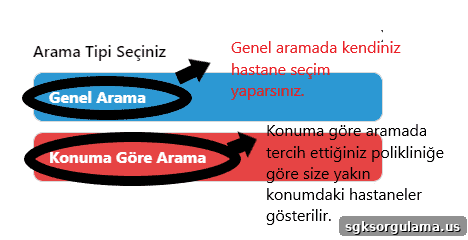
On the General Search screen you will be asked to provide the following details:
- Province (İl)
- District (İlçe)
- Clinic (Klinik)
- Hospital (Hastane)
- Examination location (Muayene yeri)
- Physician (Hekim)
If you want a particular doctor at a specific hospital, select those options from the lists. Otherwise you can mark options such as physician or examination location as “Fark etmez” (Doesn’t matter).
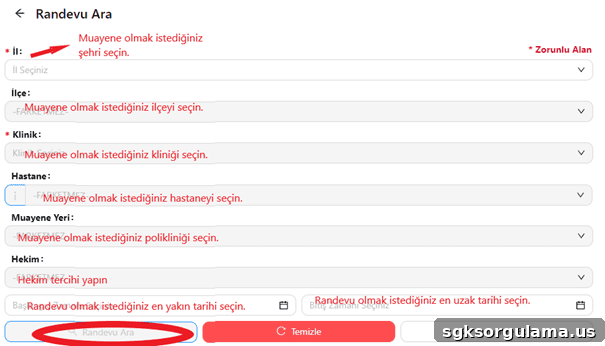
MHRS appointment results that match your selections will be displayed after you click “Randevu Ara” (Search Appointment). If no suitable options appear, adjust your selections and search again.
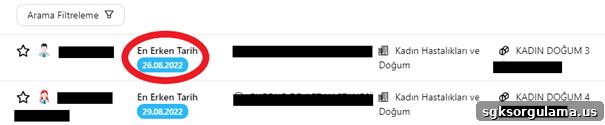
The example screen above shows results for obstetrics and gynecology. It lists the earliest available appointment dates for different physicians. Clicking any physician brings up a screen where you can choose the time.
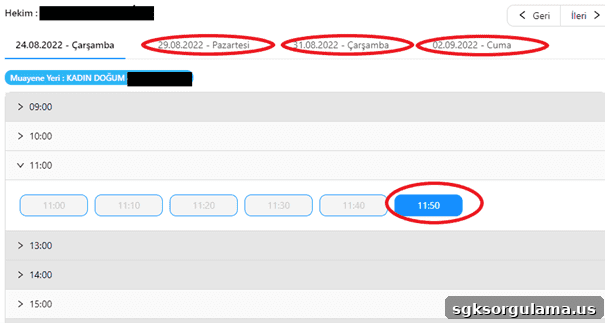
You can select a time on the earliest available date shown or choose a later date if preferred.
CHECKING YOUR MHRS APPOINTMENT
To check an appointment booked via MHRS, log in to E-Nabız or the MHRS system and view your appointment details there.
Booking a Family Physician Appointment via the MHRS Website
Follow the steps described above to book a family physician appointment on the MHRS website. After logging in with your identity number and password, click “Aile Hekimi Randevusu Al” to see the relevant details.
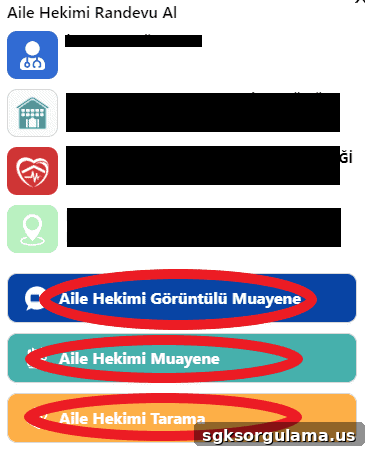
This screen shows your family physician’s name and the family health center address. From here you can schedule an in-person appointment or request a video consultation.
Booking a Vaccination Appointment via the MHRS Website
You can also book vaccination appointments through the MHRS website. After logging in with your identity number and password, choose the “Aşı randevusu alma” option.
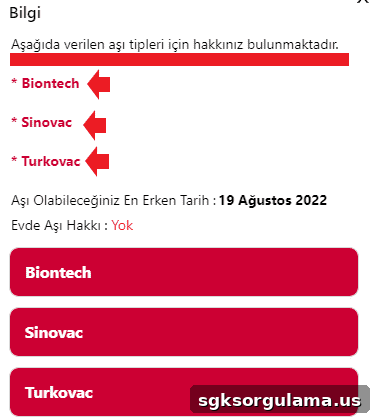
The vaccination screen lists details for COVID-19 vaccination eligibility. If you are still eligible for a vaccine, available options will be shown. The example above indicates eligibility for Biontech, Sinovac, and Turkovac, and it also displays the earliest possible vaccination date.
Booking MHRS Appointments via E-Government (E-Devlet)
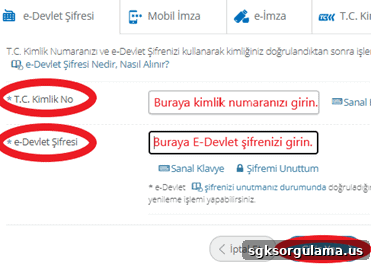
To book an MHRS appointment through E-Government, sign in at turkiye.gov.tr using your identity number and password.
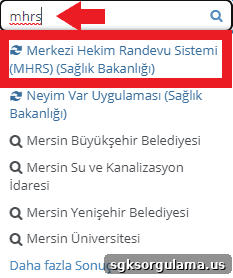
After logging in, type “MHRS” into the search field on the site to find the Central Physician Appointment System.
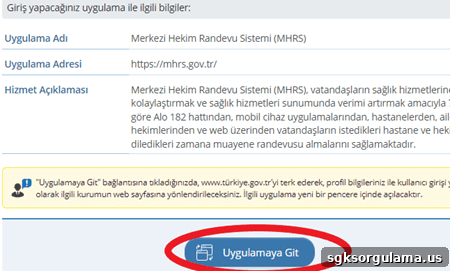
Clicking “Merkezi Hekim Randevu Sistemi” will direct you to the MHRS application. Choose “Uygulamaya Git” (Go to Application) to access MHRS without entering your password again, since you logged in through E-Government.
Booking an MHRS Appointment by Phone
You can also book an MHRS appointment by calling Alo 182. When you call, the call center agent will ask for your identity number, the hospital and department where you want the appointment, and the preferred date and time.
Booking via the MHRS Mobile App
To book an appointment through the MHRS mobile app, download the app to your phone first.
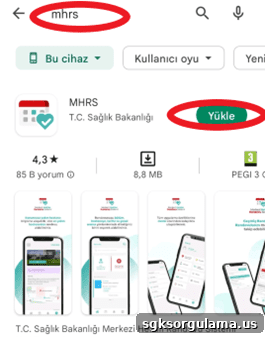
Search for “MHRS” in your phone’s app store, install the app, then log in using your E-Government or MHRS password.
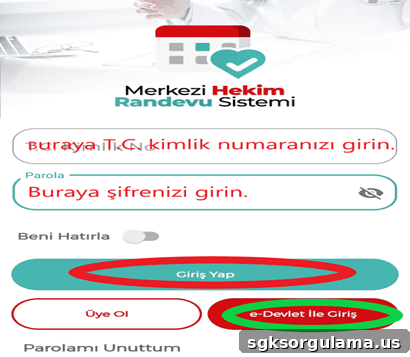
Enter your identity number and password to sign in. If you do not have an E-Government or MHRS password, use the “Üye Ol” (Register) option to create an account.
Can I Book an Appointment for Someone Else via MHRS?
To book an appointment on behalf of someone else through MHRS, you must know that person’s identity number and password. You must also have their consent. Identity numbers and passwords are private information and should not be shared for security reasons.
How Do I Cancel an Appointment?
To cancel an appointment, use the MHRS app or website. If your plans change after booking, cancel the appointment promptly so that someone else can use the time slot.
Can I Book More Than One Appointment at the Same Time?
You can hold multiple appointments at the same time as long as the appointment times do not overlap. You cannot book two appointments with the same physician at the same time. Appointments should be with different physicians or in different clinics.
Booking via E-Nabız
You can also book appointments through E-Nabız by visiting enabiz.gov.tr and signing in with your E-Nabız or E-Government password. E-Nabız also allows you to book appointments for your children.
Booking an Appointment In Person at the Hospital
You may also go to the hospital in person to book an appointment. Keep in mind the potential for long waits and physician workload—if the clinic is busy you may face long waiting times. Using the MHRS appointment system helps you attend your consultation at the scheduled time without waiting.