

With the hospital appointment screen using your T.C. identification number, you can take the first step in your treatment process. Booking a hospital appointment has become very simple since the system introduced in 2010. The new system has eliminated the long queues that used to form at hospitals.
The MHRS appointment screen with T.C. ID allows you to complete appointment procedures easily. In addition to MHRS, you can also book appointments through e-Nabız. MHRS is available both online and by phone.
Both MHRS and e-Nabız have mobile applications. With the mobile apps you can make appointments from anywhere. You can also book appointments for your child via e-Nabız. Some hospitals are not integrated with the MHRS system; university hospitals and private hospitals often use their own systems.
A doctor’s appointments may be fully booked or the doctor may be on leave. In such cases, that doctor’s availability will not appear in the system. Likewise, certain outpatient clinics may not be visible in the system due to heavy demand.
HOSPITAL APPOINTMENT PHONE NUMBER
The phone number for hospital appointments is 182. By calling 182 you can complete the appointment process quickly. Operators handle transactions on 182.
The process proceeds as follows:
- You will first be asked for your national ID number.
- Tell the operator which hospital you want to book an appointment at.
- Specify the preferred date and time.
- The operator will suggest the most suitable available date and time.
- Finally, confirm the appointment to complete the process.
After completing all steps, attend your appointment at the specified date and time. You can also cancel the appointment by calling 182.
Booking a Hospital Appointment with Your T.C. ID
You can book a hospital appointment using your T.C. ID in several ways. The primary service is MHRS, which stands for Central Physician Appointment System. To access this system, go to mhrs.gov.tr.

On MHRS’s main page you will see a screen like the one above. Click “Randevu Al” (Get Appointment) to reach the login prompt. After entering MHRS, you can access the system using your e-Devlet password.
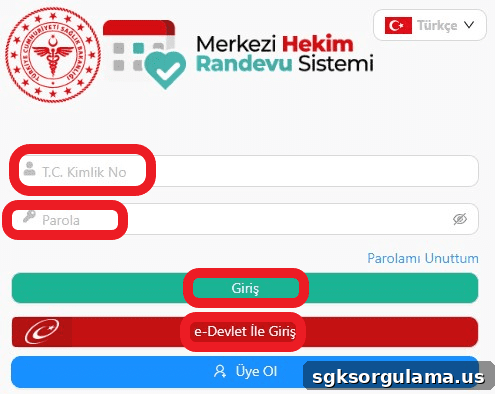
From the screen above you can sign in with a previously created MHRS password. Another option is “Sign in with e-Devlet.” You can also click “Üye Ol” (Register) at the bottom to obtain a dedicated MHRS password.
If you choose “Sign in with e-Devlet,” the system redirects you to turkiye.gov.tr. Enter your password and ID number there to start using the service. You can also sign in using mobile signature, electronic signature, or internet banking options.
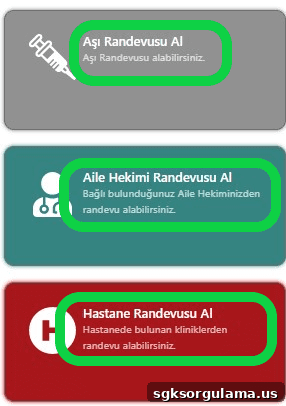
After completing login steps you will see different appointment options. From the T.C. ID hospital appointment screen you can book vaccinations, family physician visits, and hospital appointments. If you choose hospital appointment, you will see a screen similar to the one below.
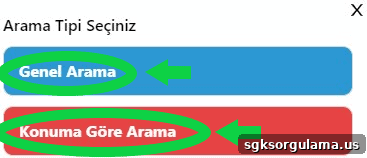
You can search for available appointments by general search or by location. To search by location, your device’s location settings must be enabled. If you use the general search, the form below appears.
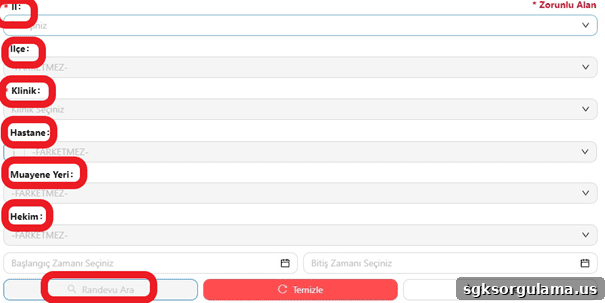
Choose your province, district, clinic, hospital, examination location, and physician to find a suitable appointment. You can save this search to your favorites so you don’t have to re-enter the information each time.
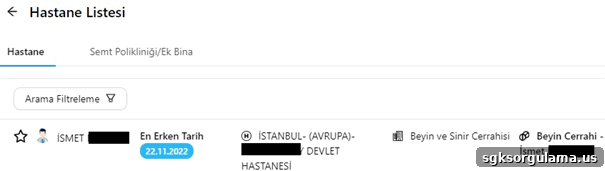
In the final step, information about the selected physician appears on the screen. The earliest available appointment date is shown. On the next screen you can choose a time slot.
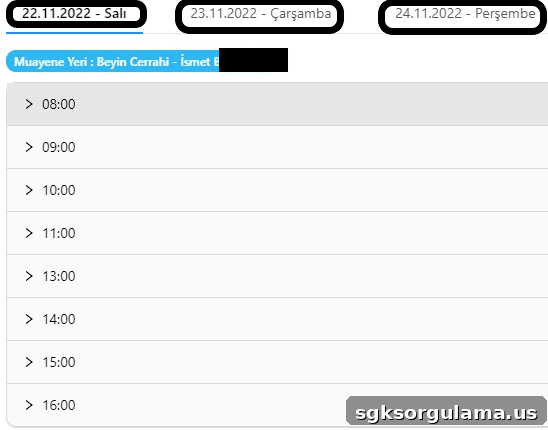
Available times will be displayed. After selecting a time, all your appointment details will appear on the screen. Check the information carefully, then confirm.
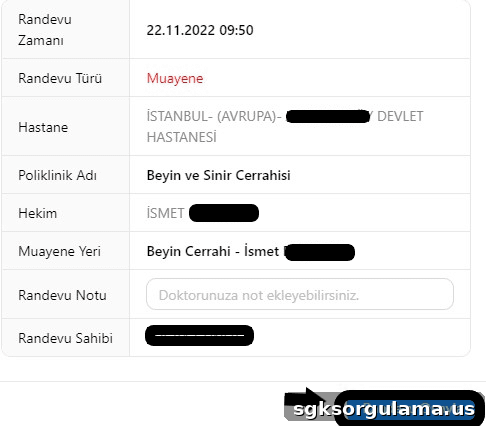
After reviewing all details, click the “Randevu Onayla” (Confirm Appointment) button to complete booking. Afterwards, arrive at the hospital on the specified date and time.
Booking an Appointment via e-Nabız
You can book appointments via e-Nabız at enabiz.gov.tr. e-Nabız is a system where you can follow your health status, reports, and test results. Use it to monitor your health regularly. You can book appointments for yourself and your children through e-Nabız.
Through e-Nabız you can also view your test results. Your vaccination schedule appears in this system, and your doctors can access your reports and test results through the platform.
How to Book a Hospital Appointment by Phone
You can book a hospital appointment by phone through 182 or by calling the hospital’s own contact numbers. When you call 182 you will need to provide your national ID number. Then state the hospital, preferred date, and time for the appointment.
Booking a Hospital Appointment via e-Devlet
You can also access the hospital appointment system through e-Devlet. Search for MHRS in the e-Devlet search field to reach the MHRS application from within e-Devlet.
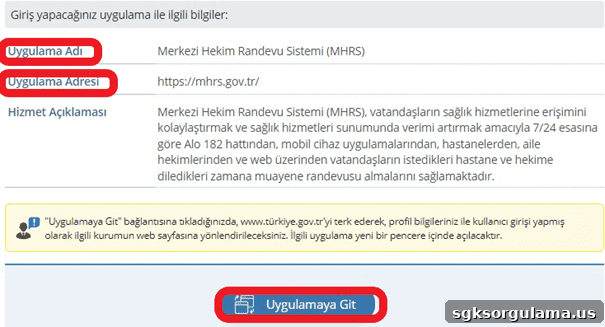
Click “Uygulamaya Git” (Go to Application) to start using the MHRS system. You can use the e-Devlet platform to reach the T.C. ID hospital appointment screen as well.