

Verifying and updating your mobile phone number and email address through the e-Devlet system is useful when facing login issues. When you encounter problems accessing the system or forget your e-Devlet password, you can use the mobile phone and email verification procedures to restore access.
To verify your email via e-Devlet: sign in with your password, go to the “My Account” (Hesabım) section, enter your email address in the “E-Posta” field and complete the process.
To verify your mobile phone via e-Devlet: after signing in, go to the “My Account” section and enter your phone number in the “Cep Telefonu” field to complete verification.
How to Verify Your Mobile Phone on e-Devlet the First Time?
The steps for verifying a mobile phone on e-Devlet differ depending on whether this is your first time logging in to the system.
If you are accessing e-Devlet for the first time, follow these steps to verify your phone:
- First, log in using the password you received from PTT and your Turkish ID (T.C. identity number).
- The screen will automatically show the contact information entry section. Enter your mobile phone number there.
- The number does not need to be registered in your name; you only need to be the user of that number.
- An SMS will be sent to the provided number. Enter the code from the SMS into the form on the screen within three minutes.
- After completing these steps, your mobile phone number will be updated in the system.
How to Verify Your Mobile Phone on e-Devlet a Second Time?
To change a previously registered mobile number, you should indicate that the existing number is no longer in use. This assumes you have used the e-Devlet system before and now wish to update the registered number.
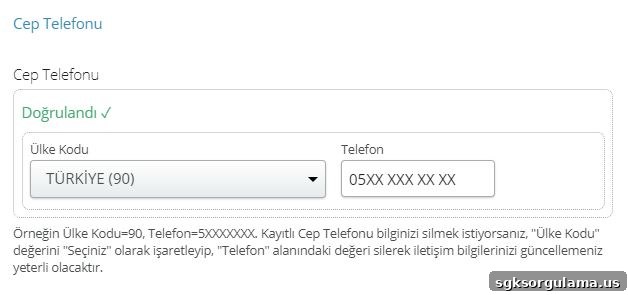
The steps for this process are:
- Log in with your e-Devlet password and T.C. identity number.
- From the menu on the right, click the “Contact Information” (İletişim Bilgileri) section.
- Go to the “Mobile Phone” (Cep Telefonu) field.
- Click the “Update My Phone Number” (Cep Numaramı Güncelle) button.
- Enter the phone number you currently use in the form and wait for the verification code to be sent.
- Use the SMS code to complete the update and save your mobile number in the system.
What Is the Purpose of Mobile Phone Verification on e-Devlet?
Updating your mobile phone number ensures that SMS messages related to e-Devlet transactions are sent to your number. Many e-Devlet-linked services use SMS for notifications and authentication.
For example, appointment confirmations for healthcare services are sent via SMS to the registered mobile number. If you lose or forget your password, password recovery processes also rely on the registered mobile phone.
What Happens If You Do Not Verify Your Mobile Phone on e-Devlet?
On first-time logins, you must provide a phone number to proceed. If you do not update your mobile number, you will not be able to receive a new password if your current password is lost.
You will not receive hospital appointment notifications by SMS, and you may not be informed about failed login attempts or other important alerts.
How to Get a New Password Using Mobile Phone Verification on e-Devlet?
Password recovery via an up-to-date mobile phone is performed with an SMS verification code. Enter your T.C. identity number and click the “I forgot my password” (Şifremi unuttum) button. You will be prompted to enter detailed identity information on the screen.
After entering the requested personal details, a verification code is sent to your registered mobile phone. If the registered phone number is not current, you cannot receive the code on a different number. Enter the code on the screen to renew your e-Devlet password.
Can You Log In Without a Password Using Mobile Phone Verification?
Passwordless login using mobile phone verification is possible only if the e-Devlet mobile application is installed on your device and mobile signature (mobil imza) has been activated for your account. If mobile signature is enabled, you can use it to sign in.
What If No Code Is Sent During Mobile Phone or Email Verification?
If you do not receive the SMS during password recovery, it may be because you are not using the registered number. If your current number differs from the registered one, you will not receive the code. Network issues can also prevent delivery. Without mobile network service, you cannot complete phone or email verification.
How to Verify Your Email Address on e-Devlet?
To update the email address registered in e-Devlet, click the “Contact Information” section on the screen, then choose the “Update My Email” (E-postamı güncelle) option. A verification code or link will be sent to the email address you provide; enter the code or follow the link to complete the update.
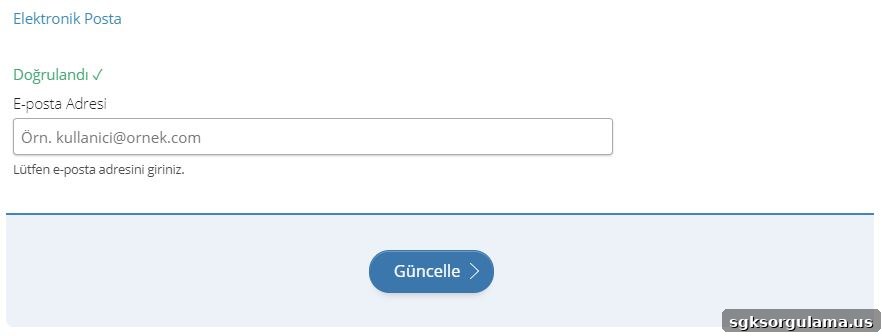
After selecting the email update option, follow the on-screen instructions and enter the verification code received by email to finalize the change.
What Is the Purpose of Email Verification on e-Devlet?
Email verification on e-Devlet is commonly used for password recovery. In addition, the system delivers some services and notifications to users via email, so keeping your email address up to date ensures you receive these communications.
For example, electronic copies of residence documents and other official documents can be delivered by email through e-services. Appointment confirmations and other service notifications may also be sent to your email address.
Can You Receive a New Password via Email Verification?
If you forget or lose your e-Devlet password, you can choose to receive the verification code by email during the “I forgot my password” process. After providing the required identity details, you will be offered a choice of delivery channels—mobile phone or email.
Select the email channel to receive the verification code or a verification link. Enter the code from the email or follow the link to reach the password reset screen and create a new password.
Can You Log In Without a Password Using Email Verification?
You cannot sign in to e-Devlet using only an email address. Email is used for verification and password recovery, but logging in requires your T.C. identity number and password. Therefore, email alone is not sufficient for access.
What If No Email Arrives During Email Verification?
If you do not receive the verification email, check your internet connection and confirm that the email address registered in the system is current. The message may also be in your spam or junk folder, so check all folders. If you still cannot find the email, update your email address and try again. System delays or temporary freezes can occur, so refreshing the page and retrying may resolve the issue.