

As with many public institutions, the Revenue Administration has implemented online services so citizens can complete their inquiries without visiting the office. One of the services available online is vehicle tax inquiry. Instead of going to the institution, waiting in lines or dealing with paperwork, you can quickly obtain information within minutes. With just a few details, you can access the latest information from any location with internet access.
The tax system plays an important role in our lives and forms a foundation of the national economy under state oversight. The taxes paid by citizens help sustain public services and economic stability. Tax amounts vary according to the type of product or service; one of these taxes is the Motor Vehicle Tax (MTV), which differs by vehicle. MTV is a tax that must be paid twice a year. Monitoring your tax obligations is important because failure to pay can result in penalties. To avoid negative consequences, you can use the vehicle tax inquiry service to access detailed information about your vehicle’s tax liabilities. Below we explain where and how to perform a vehicle tax inquiry.
How to Perform a Vehicle Tax Inquiry
Using the Revenue Administration’s online Internet Tax Office service, you can complete a vehicle tax inquiry in seconds. Within this system, the Motor Vehicle Tax section lets you view your tax debts and related details. Secure credit card payments are also available if you need to pay your tax online. No password is required to perform the inquiry. First, click the link provided at the end of this article. On the page that opens, click the option labeled “motor vehicle inquiry and credit card payment” at the top, as shown in the illustration, to go to the vehicle tax inquiry page.
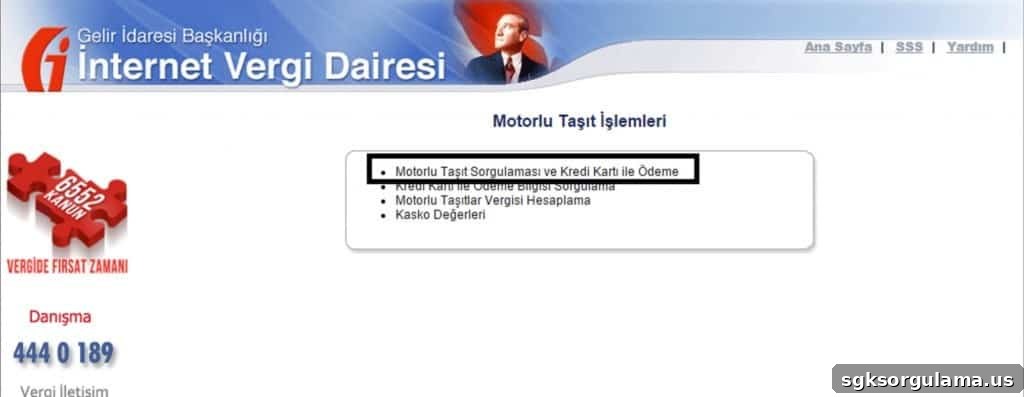
On the inquiry page, you will first be asked to enter the license plate number of the vehicle you are checking. Next, indicate whether the plate is special by selecting “yes” or “no.” Then enter your Turkish ID number or tax identification number. After that, you will be asked for the vehicle’s registration date. For new vehicles, the registration date is the date the vehicle first entered traffic; for second-hand vehicles, the registration date is the date of the notarized sale. After entering the required information, click the “Tamam” (Complete) button to finish the inquiry. This will allow you to view the vehicle tax details.
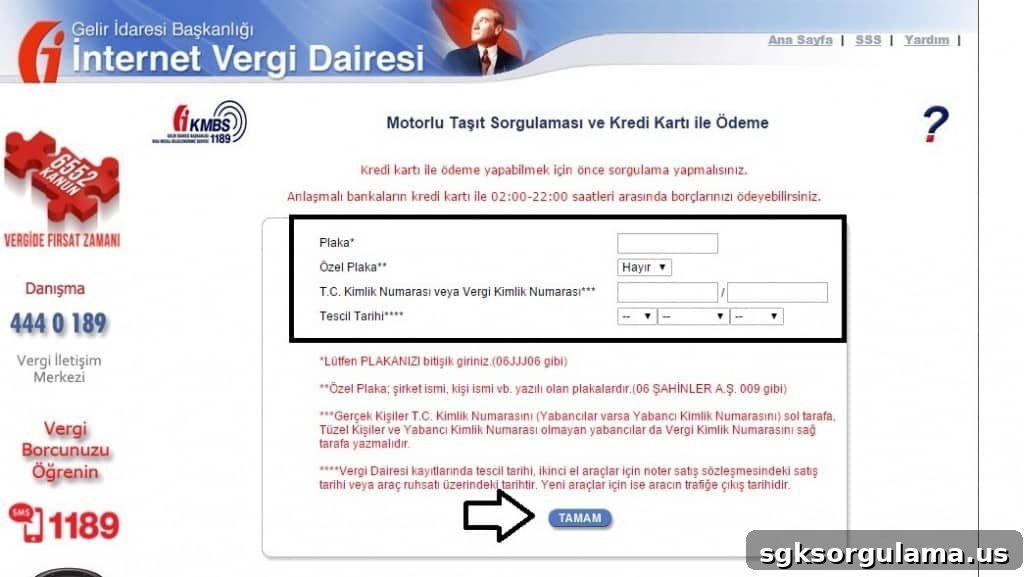
To perform a vehicle tax inquiry, click the link below:
Click here to access the Motor Vehicle Tax inquiry page