
Retirement is a highly anticipated period for insured employees. Workers earn the right to retire through the contributions and service years they complete during their careers, and they receive a pension. To begin receiving a pension, eligible applicants must first submit a retirement application and then check whether it has been approved. In this article we explain how to check retirement approval.
There are several ways to check whether a retirement application has been approved. Before detailing the approval inquiry methods, let’s briefly define what retirement is and what conditions must be met to qualify.
What Is Retirement?
Retirement is the stage when people stop working after a period of employment. Those who retire are called retirees. After retirement, individuals become entitled to a regular payment based on their past service. To preserve retirees’ standard of living, contributions must be paid at rates set by law.
In our country, for those whose insurance started in September 1999 or later (i.e., who began paying contributions from that date), the retirement age is set at 58 for women and 60 for men. That retirement age can vary depending on factors such as total contribution time and the date insurance began.
To receive a pension, you must first apply for retirement and demonstrate that you meet the required conditions. Today, retirement procedures are generally completed quickly; once approved, pension payments begin shortly thereafter.
During the processing period many applicants want to know which stage their application is at. To find out whether your retirement application has been approved, you should use the retirement approval inquiry service.
Retirement approval inquiry is also known as “Retirement Application Result Inquiry.” Through this system, applicants can see whether their application has been finalized and track which step of the process it is in.
There are two main ways to check retirement approval: via the SGK (Social Security Institution) official website and via the e-Government (E-Devlet) portal. Below we describe how to perform an approval inquiry on each platform.
Checking Approval on the SGK Website
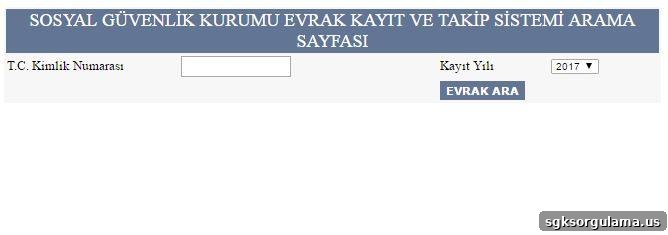
First, consider the SGK website. The SGK portal offers a document tracking and registration service that lets you see the status of documents you have submitted and whether your retirement and related paperwork have been approved. This system handles not only retirement approval but also other documents related to insured status or disability records.
The SGK document tracking page asks you to enter your Turkish ID number (T.C. Kimlik No) and the registration year, then click the “Evrak Ara” (Search Document) button. After providing those details, the system will display the current status and result of your submitted documents, allowing you to learn whether your retirement has been approved.
Checking Approval on the E-Government (E-Devlet) Portal
You can also use the e-Government portal to check retirement approval. The e-Government system provides many online public services; to access it you need an e-Devlet password. If you do not yet have a password, you can obtain one from a nearby PTT branch for a fee.
After you have your e-Devlet password, log in to the e-Government portal and enter your Turkish ID number and password on the login screen. Once signed in, follow the on-screen instructions to view the result of your retirement application and check its current processing stage.
Retirement Approval Inquiry for Civil Servant Pension Fund (Emekli Sandığı) Members
Members of the Civil Servant Pension Fund (commonly referred to as 4-C beneficiaries or Emekli Sandığı) have a specific route for checking retirement approval: this inquiry is available only through the e-Government portal.
If you belong to the Emekli Sandığı scheme, sign in to e-Government using your Turkish ID number and e-Devlet password. Under the SGK-related services you will be able to check your retirement approval and access other relevant transactions quickly and conveniently.
In summary, you can track your retirement application status either through the SGK document tracking page or via the e-Government portal. Both systems require secure identification (T.C. ID and, for e-Government, your e-Devlet password) and provide up-to-date information about whether your retirement and submitted documents have been approved.