

Citizens who want to check SGK debts can do so through the e-Devlet portal and the Social Security Institution (SGK) website. In addition to querying premium debts, payments can also be made via digital channels through banks affiliated with SGK. Using these online channels, you can check the following types of SGK premium debts without visiting provincial SGK directorates:
- SSK premium debt
- Bağ-Kur debt
- GSS premium debt
CHECK SGK DEBT WITH TC ID
To learn SGK debt with your Turkish ID number, there are two main methods. For online queries use e-Devlet; for phone inquiries without a password use the ALO 170 line. Via these two channels you can query 4B and GSS premium debts.
E-Devlet SGK Debt Inquiry
Viewing SGK debts on e-Devlet requires your Turkish ID number and e-Devlet password. This simple process lets you check 4B debt information online. Follow the steps below to access your SGK premium debt details:
- Use the “4/B Debt” link to open the “Social Security Institution 4B Debt Status” page.
- On the opened page, click the “Verify My Identity Now” button to go to the e-Devlet authentication page.
- Select the login method as “e-Devlet Password” and enter your “Turkish ID Number” and “e-Devlet Password”, then click “Login”.
After completing the steps above, you will see your 4B premium debt information. If you do not have a 4B registration, the screen displayed after the query will indicate that no record exists.
Phone SGK Debt Inquiry Without Password
To learn SGK debt by phone, you can call ALO 170. In addition to services related to the Ministry of Family and Social Services, ALO 170 assists citizens with İŞKUR and SGK inquiries. On this line, without a password, you can learn your SGK premium debts by providing your Turkish ID number and your mother’s maiden name.
GSS Premium Debt Inquiry
You can check your General Health Insurance (GSS) premium debt through e-Devlet. Citizens who are not employed in an insured job and cannot receive health services through a parent must pay GSS premiums. To query GSS premium debt, follow these steps:
- Go to the e-Devlet gateway at https://www.turkiye.gov.tr/.
- Click the “Login” button located at the top right of the main page.
- On the “e-Devlet Login” page, authenticate using your Turkish ID number and e-Devlet password.
- After authentication, type “General Health Insurance Registration and Premium Debt Inquiry (Social Security Institution)” into the search box on the main page and click the relevant result in the menu that appears.
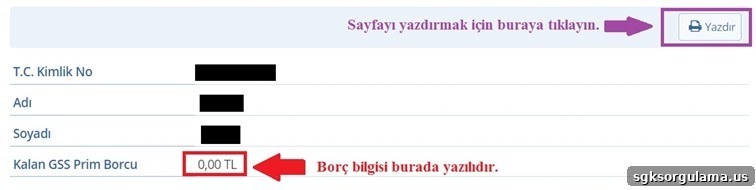
- After the query, the result screen will display your GSS premium debt in the area indicated. Use the “Print” button if you need a hard copy of the page.
SGK EMPLOYER DEBT INQUIRY
Employers can query SGK debts via the Social Security Institution’s electronic services platform. The E-SGK applications include an “Employer Debt Inquiry” module where current debt information is available with a username, system password, and workplace password. Follow these two steps to query employer debt:
- Go to the “EMPLOYER” address.
- On the opened screen, enter your “Username, system password, workplace password, and security code” and then click “Login” to view the debt information.
SGK Premium Debt Payment
There are two main digital channels for paying SGK premium debts. Online SGK payments accept credit cards. The authorized payment channels are:
- E-Devlet
- E-SGK
Pay SGK Premium Debt via E-Devlet
Payments from e-Devlet are made through the “Card Payment for Premiums” application on the Social Security Institution service page. The steps to access the payment page and pay by credit card are described below with supporting screenshots:
- Access the service page via the “Web Tahsilat” address.
- Click “Verify My Identity Now” and log in with your Turkish ID number and e-Devlet password.
- To proceed to payment, you must reach the relevant page; when prompted, click “Go to Application”.
- Allow the SGK application to access your e-Devlet information by clicking the “Approve” button on the permission screen.
- To make a payment you must first retrieve your current SGK debt. Select the “Query Type” and “Query Subtype”, then select “Registration No” and click “Query Debt”.
Once the debt amount appears, you can pay using the payment button next to the debt information by entering your credit card details.
Pay Premium Debt via E-SGK
For E-SGK payments use the “Online Tahsilat” address. Click the image shown on that page to enter the Web Tahsilat application. This application uses the same screen as the “Debt Inquiry” process described above: first query the debt to be paid, then complete the payment by credit card.
Which Banks Are Affiliated with SGK?
SGK-affiliated banks are authorized collection points. You can pay SGK premium debts via these banks’ internet and mobile branches. The following banks allow SGK debt inquiry and payment after viewing the current debt:
- Ziraat Bank
- Halk Bank
- VakıfBank
- Garanti BBVA
- İş Bank
- DenizBank
- Akbank
- Yapı ve Kredi Bank
- ING
- Burganbank
- Türk Ekonomi Bankası (TEB)
- Aktifbank
- Şekerbank