
You can check whether you carry COVID-19 by querying e-Nabız for COVID and PCR test results. The COVID pandemic emerged at the end of 2019 and affected the entire world in the 21st century. Because the virus is still present, if you experience suspicious symptoms you can use the e-Nabız system to view your COVID and PCR test results.
COVID affects people differently: some experience severe illness while others have mild symptoms. Because you cannot predict how it will affect you, it’s important to remain cautious. You can protect yourself by getting recommended vaccine doses, maintaining social distancing, and following hygiene measures.
What Are COVID and PCR Tests?
COVID and PCR tests determine whether you are carrying the virus. Tests are performed by healthcare facilities or with at-home kits. Results from hospital or clinic tests can be viewed through the e-Nabız system. During testing, swabs are taken from the throat and nose; these samples are examined in a laboratory to detect the presence of the coronavirus.
In addition to tests performed in healthcare settings, you can purchase self-test kits from pharmacies and use them at home. These kits do not guarantee 100% accuracy, so visiting a healthcare facility for testing is advised when possible. The table below shows the most recent weekly case and death counts.
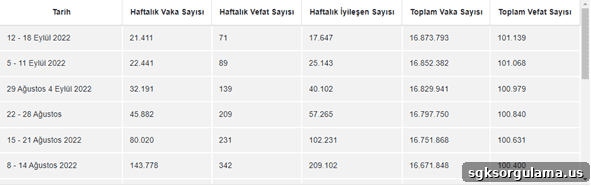
According to the latest data in the table, weekly case numbers exceed 20,000 and the most recent reported deaths were 70. These figures indicate the disease remains active and underscore the importance of taking necessary precautions.
How to Query e-Nabız COVID and PCR Test Results
To check your COVID and PCR test results on e-Nabız, visit enabiz.gov.tr. e-Nabız is a system where you can access personal health information, including hospital visits, test results, reports, and medications. You can use these records when needed or print them to present to institutions that request your health information.
Accessing the E-Nabız System
Access to e-Nabız requires your password and identification number. You can obtain an e-Nabız password or log in using your e-Government credentials. First, go to enabiz.gov.tr to begin.
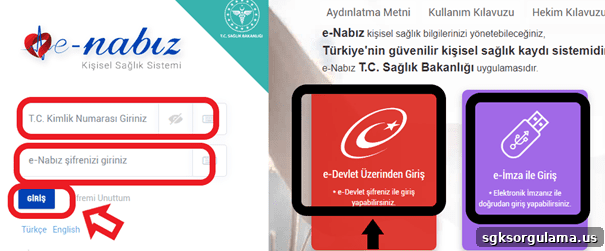
On the login screen shown above you can enter your e-Government password or use an electronic signature to sign in.
Navigating to the PCR Test Results Section
After completing the login process, you will reach the e-Nabız main page. The following screen appears once you are logged in.
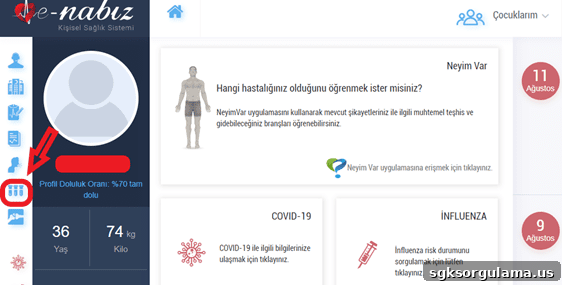
From the e-Nabız main page, use the section indicated above to perform queries. The icon shown corresponds to the “My Tests (Tahlillerim)” section.

Inside the “My Tests (Tahlillerim)” section, look in the top-right area for the “COVID-19 Test Result” area. Clicking there will display tests that have available results.
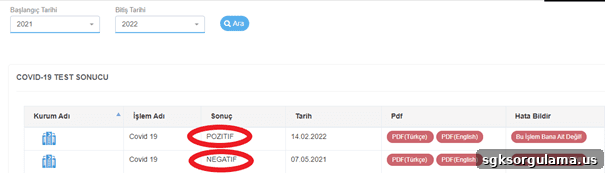
The “COVID-19 Test Result” section lists your results in chronological order. This lets you determine whether you currently carry the virus and take appropriate precautions. There may also be legally required measures to follow based on your result.
Can I Query PCR Results for My Children?
You can check PCR test results for your children. On the e-Nabız main page the “My Children (Çocuklarım)” option appears in the top-right. If you have more than one child, select the child whose results you want to view and then access “My Tests” to see the test outcomes.
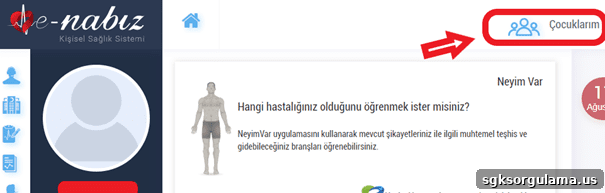
After selecting the child, open “My Tests” to review the results.
Checking PCR Results Outside E-Nabız
You can also check PCR results using the Hayat Eve Sığar application. Once a test result is finalized, your status in the app will appear as “Risky” if it is positive. This allows you to recognize a positive result within the app.
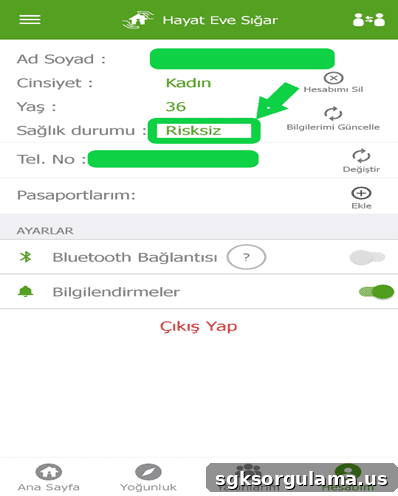
The section labeled “Not at Risk (Risksiz)” will change to “Risky (Riskli)” if your test is positive.
What Does a Positive PCR Result Mean?
A positive PCR result means you are infected with the virus. In Turkey, a 7-day isolation period is typically advised for COVID patients. During isolation, patients should not leave home or come into contact with others. For close contacts who are unvaccinated or have not previously had the disease, a quarantine period may be required. After these isolation or quarantine periods, patients and close contacts can resume normal activities.
What Does a Negative PCR Result Mean?
A negative PCR result means you are not carrying the virus at the time of the test. If you have symptoms but a negative PCR test, another medical condition may be causing your symptoms; consult a physician to determine appropriate treatment.
How Long Until PCR Results Are Ready?
PCR test results are usually available within 24 hours. Once processed, your result appears in the e-Nabız system. You can check periodically for updates, and you may also receive an SMS notification. In earlier stages of the pandemic, healthcare workers sometimes delivered medications to patients at home, but that practice is no longer routine. If your condition worsens, contact healthcare services for assistance.
How to Print Your PCR Test Result
You can download and print PCR test results. After checking your COVID and PCR test result in e-Nabız, use the “PDF (Turkish)” option next to the result to download the document. You can present this printed result to institutions that require proof of your test outcome.
How to Verify a PCR Test Result
To verify a PCR test, visit the PCR verification page. You will need the following information to perform the check:
- Barcode number
- The last four digits of the Turkish ID number
- Mobile phone number
- Email address
You can also verify using a passport number instead of an ID number if applicable.
The barcode number appears on the document provided by the hospital for your test. Enter that barcode into the verification field shown above.
Can I Query Past PCR Test Results?
Yes — past PCR test results can be queried. The query screen displays all previously taken tests, allowing you to see how many times you have had the illness in the past.
Can I View Someone Else’s PCR Result?
You cannot access another person’s PCR test results. e-Nabız requires a personal password for access, and logging in with someone else’s credentials is a legal violation. You may access e-Nabız for individuals for whom you are the legal guardian.
What Else Can You Do on e-Nabız?
e-Nabız offers many other services, including booking and canceling appointments, viewing test images, and more. You can also schedule and track COVID-19 vaccinations through the system.
COVID-19 Vaccine Records
Use the vaccine records section to view vaccines you have received and check whether you are due for any additional doses.
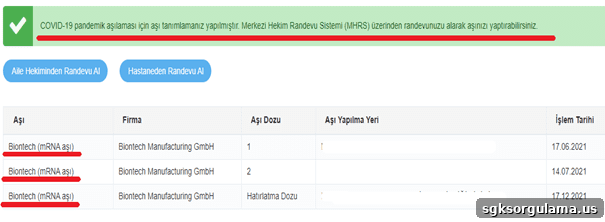
The vaccine record shows which vaccine types you received, allowing you to determine which dose you should take next. Completing your vaccine schedule strengthens your protection against COVID-19. If you previously experienced adverse effects from a particular vaccine, discuss alternatives with your healthcare provider.
Scheduling a COVID-19 Vaccination Appointment
To book a COVID-19 vaccine appointment, click “Make an appointment from family physician” or “Make an appointment from hospital” at the top of the vaccine record screen. The system redirects you to the MHRS interface where you can choose a family physician or hospital and complete the appointment booking.
Creating a COVID-19 Vaccination Card
You can create a COVID-19 vaccination card through e-Nabız, which can be used for international travel or institutional requests. The card is issued to individuals who have completed at least two vaccine doses.
Making Appointments
You can book medical appointments via e-Nabız. When ill, schedule an appointment to receive appropriate care by accessing the appointment screen after logging in.
Click the calendar icon on the left to access “My Appointments.” This section displays past appointments and lets you make new ones. Selecting “Make Appointment” redirects you to MHRS, where you can choose a hospital and doctor to finalize the booking.
Viewing Past Diagnoses
View previous diagnoses in e-Nabız to see diagnoses made during prior hospital visits.
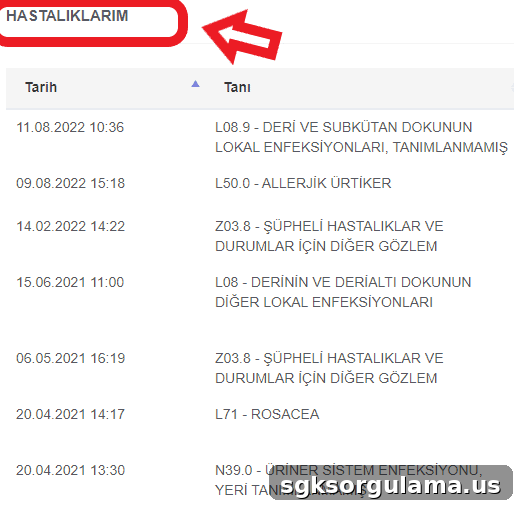
The screen above displays diagnoses from all hospital visits. Doctors can review these records to understand your medical history and adjust medications or treatment plans accordingly. Accurate records help clinicians decide on appropriate prescriptions, such as recommending stomach protectants if you have gastric issues.
Creating a Vaccination Schedule for Children
You can create a vaccination schedule for children through e-Nabız. Schools or event organizers may request proof of vaccinations, and e-Nabız allows you to generate and present the required schedules and remaining vaccine information.
Viewing Prescriptions
Prescription viewing lets you see medications prescribed by your doctor. If you lose a prescription number, you can retrieve it here to purchase medications. This section also includes medication reminders and warnings about possible side effects entered by your physician.
Adding Emergency Notes
You can add emergency notes in e-Nabız so that essential information is available if you are taken to the hospital. Include details such as penicillin allergy or other critical medical information needed in emergencies.
Accessing Radiology Images
Radiology images such as X-rays and ultrasound results are accessible in the system. This prevents unnecessary repeat imaging and enables your doctor to review existing images for assessment.
Patient and Relative Notifications
The patient and relative notification section provides access to information about you and your relatives. You can designate emergency contacts and monitor details such as ICU status, ventilation, ICU type, and dialysis connection. By using e-Nabız not only to check COVID and PCR test results but also to manage these features, you can monitor health status continuously.