

There are several ways to check enforcement (debt collection) files. Enforcement proceedings are initiated by a creditor when a debt is unpaid. Creditors seek to collect debts through enforcement offices and courts. Because repeatedly visiting the court can be difficult, you can follow the process online by performing an enforcement file query.
What Are the Methods for Querying an Enforcement File?
The most common method for querying enforcement files is via E-Government. You can sign in to the system using your E-Government password and Turkish ID number on the website or app. After signing in, simply type “icra” (enforcement) into the search field.
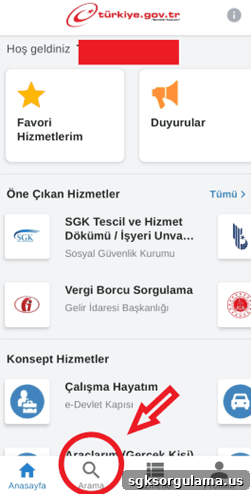
When you type “icra” in the search field, several options appear. Click the “Enforcement File Query” option to view all enforcement files registered under your identity.
As the image above shows, you can also query enforcement files belonging to a deceased person. In other words, you can track enforcement proceedings related to someone who left you an inheritance.
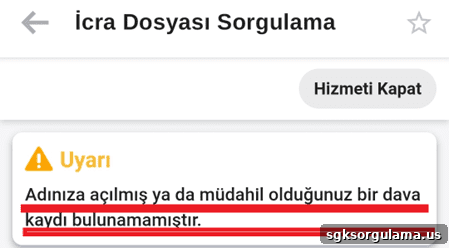
If no enforcement proceeding has been initiated against you or if the file has not yet been registered, you will see a notification like the one in the image above. If you are certain that an enforcement action has been started against you but it does not appear online, you should visit the enforcement office or court in person for information.
How to Query by File Number
Querying an enforcement file by file number is not generally possible online without additional credentials. You need your E-Government password and Turkish ID number. If you already know which enforcement office holds the file, you may be able to query using only the file number by applying directly to that office with your ID and file number. The office can provide the amount due, payment deadline, and other details.
How to Query an Enforcement File Using T.C. Identity Number
To query enforcement files with a Turkish ID number, you typically need to apply at the enforcement office. Through that procedure you can access relevant information and create a payment plan if needed.
Can I Query Someone Else’s Enforcement File?
Accessing another person’s enforcement file is allowed only under specific conditions. As mentioned earlier, you can query files related to a deceased person’s estate. Attorneys may also query files on behalf of clients who have granted them power of attorney. Without a power of attorney, inheritance relationship, or other legal authorization, you cannot view another person’s enforcement file.
How to Query Enforcement Files via UYAP
You can query enforcement files on UYAP using your E-Government password and Turkish ID. First, go to the citizen UYAP portal at vatandas.uyap.gov.tr. You will see the login screen.
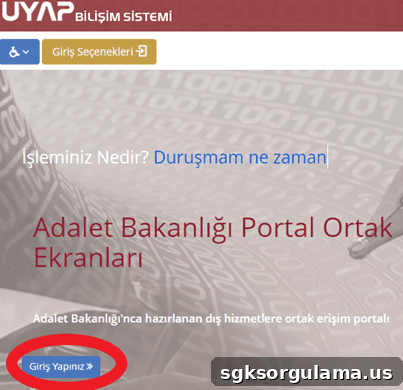
Clicking “Sign In” presents several login options, such as:
- E-Government password
- Electronic signature (E-signature)
- Mobile signature
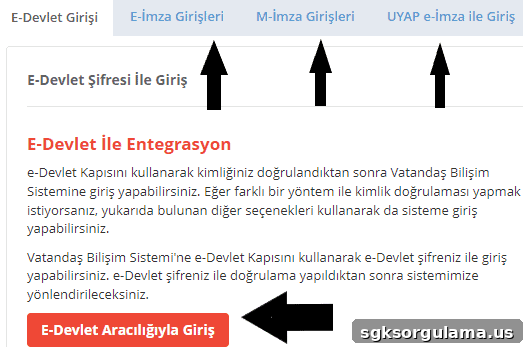
Choose one of these options to enter the UYAP Citizen system. If you sign in with E-Government credentials, you will be prompted for your Turkish ID number and password.
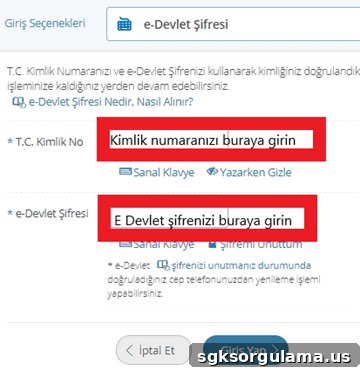
After entering your information, click “Sign In” to access the system. Once logged in, several menu options appear.
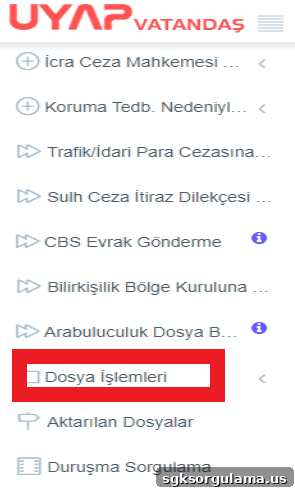
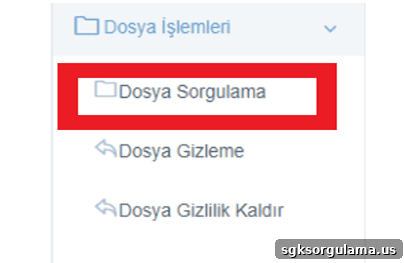
From these options, select “File Transactions” and then click the “File Query” button.
After clicking “File Query,” you reach the final step: select the jurisdiction type as enforcement and choose the relevant court or office.
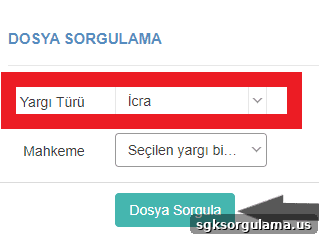
Click “Query File” to see all details about your case. If the case is closed or not yet available in UYAP, the system will indicate “No file found in the selected jurisdiction.”
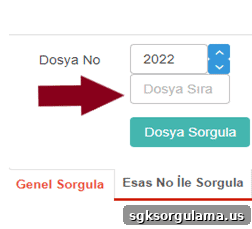
You can also search UYAP using other criteria such as principal number (Esas No), opening date, and closing date. The image above shows how to find a file by principal number.
How to Query a Company’s Enforcement File on UYAP
Querying a company’s enforcement file follows a similar process. Company representatives should first register for the “UYAP Institution Portal.” The designated representative must possess an e-signature or mobile signature to register.
How Attorneys Query Their Client’s Enforcement Files on UYAP
Attorneys have the right to query their clients’ enforcement files using the dedicated UYAP Lawyer Portal. Once logged into the Lawyer Portal, an attorney can view the status of a client’s debt. The attorney must first be granted power of attorney by the debtor.
When Does an Enforcement File Appear in the System?
An enforcement file appears in the system from the date the case is opened. The case is opened when the creditor or their attorney files the application. After issuing a payment order, the debtor has seven days to object. If the debtor does not object and does not pay, enforcement proceedings begin and the file becomes visible in the system.
How Do I Learn Which Enforcement Office Holds My File?
To find which enforcement office holds your file, use UYAP or E-Government query services. The office handling the case is displayed in the system, and official notifications sent to your address also include this information.
How Many Ways Can an Enforcement File Be Opened?
There are two main ways to open an enforcement file. One is judicial enforcement (ilamlı takip), where a court decision precedes the enforcement action. The other is non-judicial enforcement (ilamsız takip), which begins by applying directly to the enforcement office.
A type of non-judicial enforcement applies specifically to negotiable instruments, such as bills of exchange. To use this method, the claim must be documented by a negotiable instrument like a promissory note, check, or bill.
Which Documents Are Required to Open an Enforcement File?
There is no strict document restriction for opening an enforcement file. A creditor can initiate enforcement even without supporting documents. However, the debtor may object and halt the process, so providing proof of the claim is important to support the creditor’s case.
What Should People with an Enforcement File Pay Attention To?
The most important step for those with an enforcement file is to pay the debt as soon as possible. Creditors pursue enforcement to recover the owed amount. If the debt remains unpaid, the debtor’s salary, home, and business assets may be subject to seizure.
Salary garnishment due to unpaid enforcement debts can also threaten employment. Repeated or multiple garnishments may create extra burden for the employer and could lead to dismissal for valid cause.
Nonpayment of enforcement debt can also lead to imprisonment in the form of “coercive detention” (tazyik hapsi), which may be imposed for a limited period, typically up to approximately three months in certain cases.
When Is an Enforcement File Removed from E-Government?
An enforcement file will be removed from E-Government under certain conditions, such as:
- The enforcement proceedings are suspended
- The creditor waives the claim
- The debt is fully paid
- The statute of limitations is reached
- The enforcement is lifted following a successful objection by the debtor
When at least one of these conditions is met, the file will no longer appear in E-Government and UYAP.
Where Can I Pay My Enforcement Debt?
You can pay the enforcement debt directly at the competent enforcement office. You may also pay the creditor or the creditor’s attorney. Alternatively, debts can be settled using a credit card through the UYAP system.
When Does an Enforcement Debt Expire?
Ordinarily, enforcement debt expires after ten years under the law. An exception arises if the creditor renews the enforcement by attorney request, in which case the limitation period may extend up to twenty years. You can monitor whether a debt has expired by performing an enforcement file query.