
By defining a bank account in e-Devlet, you can receive personal payments much more easily. e-Devlet is the platform where you manage transactions with public institutions. On this platform you can choose how certain payments will be received.
If you do not define a bank account in e-Devlet, payments are made through PTT. To collect a payment via PTT you must visit a branch in person, which can often be inconvenient. Because you may not always have time to go to a PTT branch, you might not be able to receive your payments when you need them.
Personal payments are made in certain circumstances. You can define a bank account for different payments such as temporary incapacity benefits, nursing allowance, and tobacco-related payments.
You may only use accounts registered in your own name for these payments. It is not possible to receive payments to your spouse’s, sibling’s, or child’s account. If you do not yet have an account, you can open one and then register it on e-Devlet.
How to Register a Bank Account on e-Devlet
Registering a bank account on e-Devlet makes receiving payments easier for insured persons, retirees and entitled beneficiaries. To register an account, first go to turkiye.gov.tr. You will need your e-Devlet password or another supported login method.
You can obtain the password used for account registration from a PTT branch. Other login methods include internet banking, e-signature, and mobile signature. Choose the most convenient option to access the e-Devlet system.
When you first visit turkiye.gov.tr you will see the screen shown below.
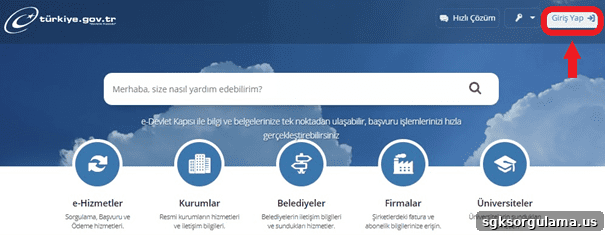
Click “Giriş Yap” (Sign In) to reach the password entry screen.
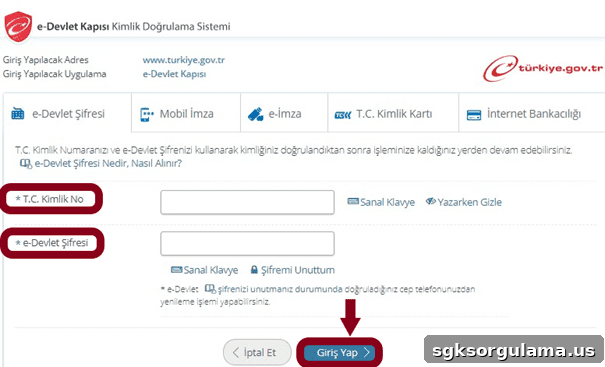
Enter your ID number followed by your password, then click “Giriş Yap”. After logging in, type “banka hesabı tanımlama” in the search bar to find the relevant section.

Next, click on “Şahıs Ödemeleri Banka Hesabı Tanımla” (Register Bank Account for Personal Payments).
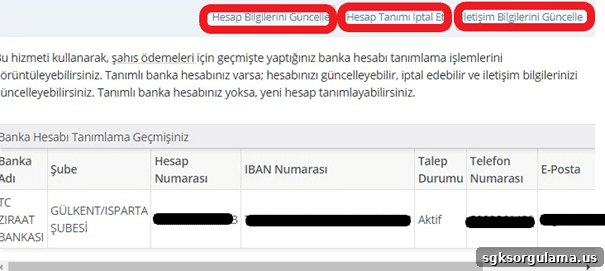
The screen above displays any previously registered account information. To add a new account, click “Hesap bilgilerini güncelle” (Update Account Information) at the top. From there you can select the bank account number you want to use.
Is a Bank Account Required to Receive Sick-Leave Pay?
A bank account is not mandatory to receive sick-leave pay. If your bank account is not registered in the system, personal payments made to you are deposited at PTT. You can collect the payment by presenting your ID at a PTT branch.
Sick-leave pay applies when employees receive a medical report and take leave. Workers are entitled to a medical report in cases of illness, injury, or other conditions that require rest. The physician determines the length of the leave.
Employees receive a temporary incapacity allowance for the period covered by the report, commonly called sick-leave pay. This allowance starts after the first two days. For example, if an insured person has a seven-day report, payment is made for only five of those days.
The payment rate for sick-leave varies: for outpatient treatment it is one-third of salary, and for inpatient treatment it is one-half. The total payment depends on the employee’s salary. Payments are made within ten days after the report is recorded in the system. You can check whether a payment has been made via e-Devlet.
Which Banks Can Be Registered on e-Devlet?
Many banks are supported on e-Devlet. Common options include:
- Akbank
- Albaraka Türk
- Burgan Bank
- DenizBank
- Fiba Bank
- Garanti BBVA
- Halkbank
- Kuveyt Türk
- QNB Finansbank
- Şekerbank
- Türkiye Ekonomi Bankası
- İş Bankası
- Vakıflar Bankası
- Ziraat Bankası
- Vakıf Katılım Bankası
- Yapı ve Kredi Bankası
- Ziraat Katılım Bankası
You can register an account on e-Devlet from any of the banks listed above. When you select your bank in the account query section, your account information appears automatically in the system, so you usually do not need to enter extra details.
After selecting a bank and clicking “Sorgula” (Query), your account details will be shown. If you have multiple accounts at the same bank, choose the appropriate one. Then click “Devam Et” (Continue).
Once your bank account is registered, payments will be deposited into the selected account and you will no longer need to visit PTT. You can withdraw money from your bank’s ATMs or shared ATMs, or transfer funds via internet banking without withdrawing cash. If you do not yet have an account, open one at any bank you prefer—either in person or online. Which bank you choose is entirely up to you.
After you open an account, it should appear automatically in the system. Pick the account you use most often when choosing among multiple accounts. Consider ATM accessibility and transfer fees when deciding which account to use.
The wide range of bank options on e-Devlet helps ensure that most insured individuals can receive payments directly into their bank accounts.
Checking Your Registered Bank Account on e-Devlet
You can check your registered bank account via the “Şahıs ödemeleri banka hesabı tanımlama” section. This area displays previously registered account information and allows you to make changes or start using a new account.
Registering a bank account on e-Devlet is especially helpful for those who cannot spare time to go to PTT. It also benefits anyone who prefers to receive funds directly into their account rather than handling cash. If you do not need cash, you can leave the payment in your account and manage it electronically.
Funds left in your bank account will remain until you use them. However, payments deposited at PTT must be collected within a certain period; otherwise the amount is returned to the Social Security Institution (SGK). If PTT-held sick-leave payments are not collected within two months, they are returned to SGK.
Payments made through PTT cannot be collected by another person; you must present your ID in person. If your health condition prevents you from visiting PTT, this can be problematic.
Register your bank account now to receive payments conveniently. Once funds are in your account you can use them as you wish: pay debts or transfer money to other accounts easily.
Closing a Bank Account on e-Devlet
You have the right to close a bank account registered on e-Devlet. Account opening, modification, and closure are all managed from the same section. You can cancel registration via “Şahıs ödemeleri banka hesabı tanımlama”.
In some cases you should close a registered account to avoid problems—for example, if you no longer use that account or if your bank card is lost. You may also close an account if you prefer to use a different bank.
After closing an account, you can choose not to register any account and instead receive payments through PTT. Some insured persons find this method easier and prefer not to manage a bank account. Registering a bank account on e-Devlet is optional and based on personal preference.