
IZSU bill inquiry can be performed online in several ways. This allows you to pay your debt before interest accrues and to quickly check for any incorrect charges. You can use the institution’s official website, mobile app, or the E-Government portal to perform an IZSU bill inquiry.
IZSU stands for İzmir Water and Sewerage Administration (İzmir Su ve Kanalizasyon İdaresi Genel Müdürlüğü). The organization manages the city’s water network, handles necessary maintenance and repairs, and collects utility bills.
WHAT CAN YOU DO FROM THE IZSU WEBSITE?
The services on the IZSU website are not limited to bill payments. Many transactions are available online, along with informational content such as blog posts and news about water services. You can follow updates on new treatment systems and ongoing projects on the IZSU website. The same services are generally available through the mobile application as well.
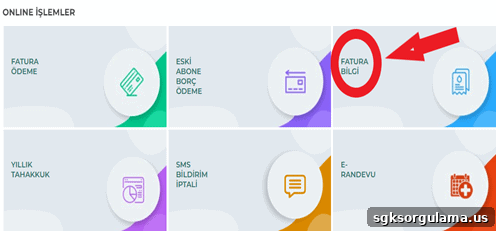
From the homepage, open the “Online Services” tab and select the transaction you want from the screen shown above.
WHAT INFORMATION IS NEEDED FOR AN IZSU BILL INQUIRY?
The information required for an IZSU bill inquiry depends on the platform you use. E-Government queries require your national identity number, while queries on the IZSU site typically require your subscriber number.
HOW TO CHECK YOUR BILL ON THE IZSU WEBSITE
To check your bill on the IZSU website, go to izsu.gov.tr, then navigate to the “Online Services” section and select “Invoice Information.”
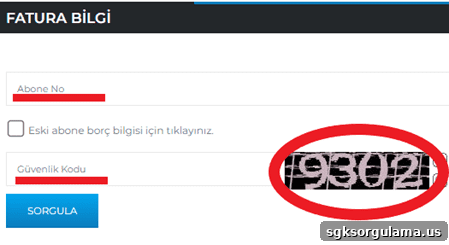
When you click “Invoice Information,” a query screen appears asking for “Subscriber No” and “Security Code.” Enter the subscriber number printed on your invoice and then type the five-digit security code shown on the screen.
After entering the required information, your invoice will be displayed on the screen.
HOW TO CHECK IZSU BILLS VIA E-GOVERNMENT
To check IZSU bills via E-Government, first log in with your identity number and password at turkiye.gov.tr or through the E-Government mobile app.
After logging in, type IZSU in the search box to access the institution’s page on the E-Government platform.
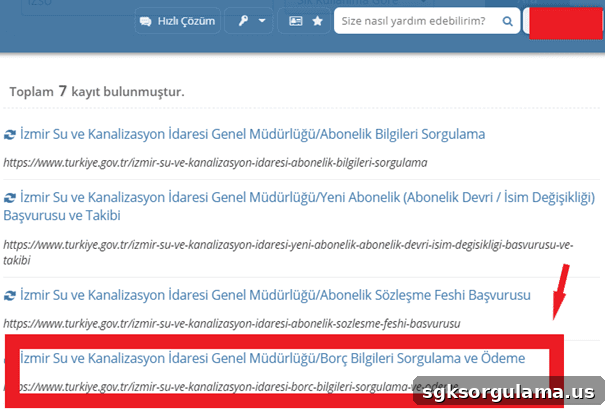
From the search results, select “Debt Information Inquiry and Payment.” If invoices exist for your account, they will appear on the following screen.
HOW TO CHECK YOUR BILL USING THE IZSU MOBILE APP
To check bills via the IZSU mobile app, first download the app to your phone. Android users can find it on the Play Store and iOS users on the App Store. After installing the app, access the bill inquiry section from the main screen.
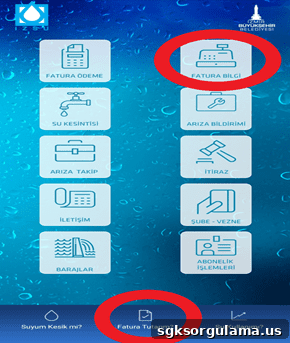
On the main screen you can check your debt from two places: the “My Invoice Amount” button at the bottom or the “Invoice Information” option at the top right.
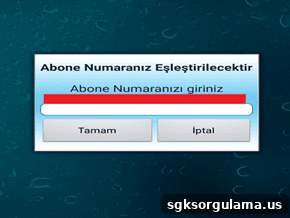
On the next screen, enter your subscriber number to view the current outstanding amount.
IZSU BILL PAYMENT
Invoice payments can be made on the IZSU website. To complete a payment you will need to enter your subscriber number.
DISABLING IZSU SMS NOTIFICATIONS
Disabling SMS notifications stops IZSU from sending messages to your phone. IZSU uses SMS to remind you of unpaid bills and outstanding balances. If you disable SMS notifications, you will need to track your invoices manually.
IZSU E-APPOINTMENT (E-RANDEVU)
E-Appointment is used to schedule in-person subscription transactions. Book an appointment and complete your procedures at the IZSU office on the scheduled date.
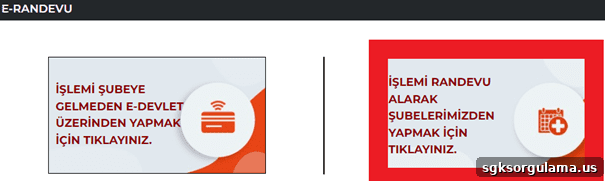
To request an appointment, click the area on the right. If you need to complete subscription procedures without an appointment, choose the option on the left.
IZSU REQUEST AND FAULT APPLICATION INQUIRY
Through the request, fault, and application inquiry screen you can submit support requests for problems in the water network.
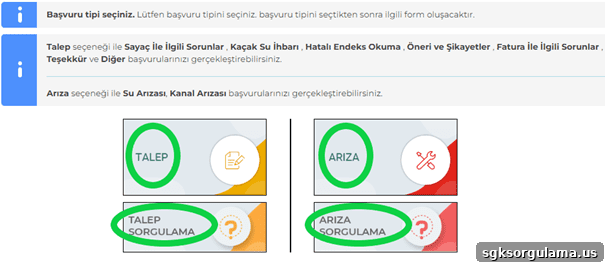
In addition to IZSU bill inquiry, the screen above shows several transaction options including request submission, fault reporting, and query options. Choose the option that best matches your need based on the descriptions provided.
INQUIRY FOR FORMER SUBSCRIBER DEBT
You can use the IZSU website to check debt for former subscribers. This allows you to find any outstanding balance even after your subscription has been cancelled.
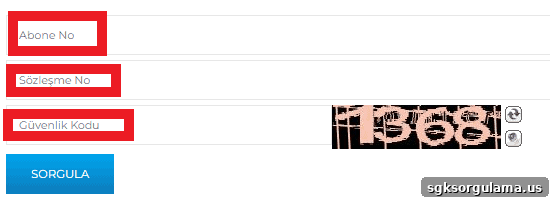
On the former subscriber inquiry screen, fill in all required information completely and click the “Query” button to see any remaining debt.
WHAT IZSU SERVICES ARE AVAILABLE ON E-GOVERNMENT?
Many IZSU services are available through the E-Government portal, allowing you to manage water administration matters from a single platform.
Subscription Information Inquiry
You can query subscription information via E-Government, which helps you find your subscription number and related details.
Subscription Transfer / Name Change Application and Tracking
Subscription transfer or name change applications and tracking are typically used when moving house or purchasing a property. To use these services, a subscription contract must be registered in the system and a transfer application submitted. You can then track whether the process has been completed.
Subscription Contract Termination
Subscription contract termination allows you to end your subscription, usually when vacating a property. After termination, any outstanding balance is calculated and collected.
Fault and Maintenance Information Inquiry
Fault and maintenance information inquiry helps explain the reasons for water outages. The service shows where maintenance or faults are occurring across İzmir central and district areas and provides the reported reason for the issue.
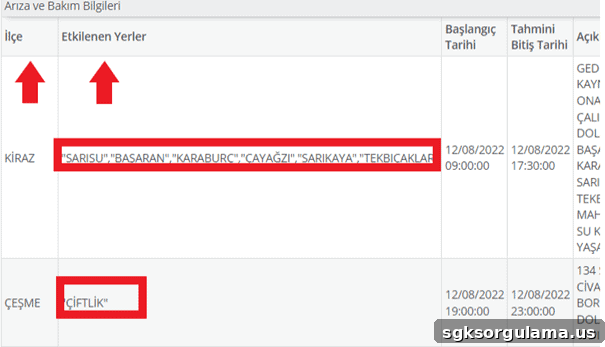
The screen above shows the results of a fault and maintenance inquiry, including the affected district, estimated resolution time, and additional explanation for the issue.
Document Verification
Document verification is available through E-Government and can be used to confirm documents submitted to various institutions.
WHAT CAN YOU DO WITH THE IZSU MOBILE APP?
The IZSU mobile app simplifies interactions with the institution and makes transactions faster. Using the app reduces the need to visit a branch in person.
You can pay bills via the mobile app. Sections for reporting and tracking water outages and faults help resolve problems more quickly.
The app also lets you monitor water consumption, which can help you save money if usage is high. You can file objections to bills through the app if you believe a charge is incorrect.
HOW IS IZSU DEBT CALCULATED?
IZSU debt calculation is based on meter readings. After meters are read, an invoice is generated for each subscriber. The calculation includes additional charges such as VAT and wastewater fees. Average daily consumption for a family of four is estimated at 0.6666 m3 per person. The subscriber’s consumed m3 is multiplied by the rate for their subscriber category to determine the total. This is how IZSU bill inquiry results are produced.