

Today almost every household owns a motor vehicle, and this rate continues to rise. When a vehicle is purchased, it must be registered with the traffic authorities. Otherwise, driving an unregistered vehicle can lead to penalties for the driver. In this article we will cover how to check vehicle registration status.
Before explaining how to check traffic registration, let’s answer: how is a vehicle registered and which documents are required during registration?
Registration of New Vehicles
One important topic in vehicle registration is registering brand new, first-owner vehicles. When you buy a new vehicle, you must have it registered with the traffic registry; otherwise you may face fines. The documents required for registering a new vehicle typically include:
- The invoice issued for the vehicle and the dealer’s authorization certificate who issued the invoice.
- Certificate of conformity.
- Original Special Consumption Tax (ÖTV) payment document.
- Compulsory liability insurance.
- National identification number.
- Chamber of Commerce trade registry extract.
- New registration file issued by the Drivers’ Chamber.
- Signature circular.
These are the documents needed to register a newly purchased vehicle. To have the vehicle registration card issued, the Special Consumption Tax (ÖTV) for the vehicle must be paid in the vehicle owner’s name. ÖTV is usually paid by the selling dealership and an invoice is issued. Afterwards, the documents listed above are submitted by the vehicle owner to the Traffic Registration Branch. If the owner cannot attend, an authorized representative may submit the documents on their behalf. After the documents are submitted, the Traffic Branch assigns the vehicle’s license plate.
The Drivers’ Chamber prints the assigned plate after the registration of a new vehicle. Once the computer records are completed, the traffic and registration documents are signed by authorized personnel and the registration process is finalized.
This is the typical procedure for registering a brand new vehicle. Next, we will examine how registration is handled for used vehicles.
Registration of Used Vehicles
Another important aspect of vehicle registration concerns used vehicles. Interest in the used car market is strong, so it is useful to know the documents required to register a second-hand vehicle. Required documents for registering a used vehicle typically include:
- Notarized bill of sale.
- Compulsory liability insurance policy issued in the buyer’s name.
- Tax clearance certificate.
- National identification number.
- Previous traffic registration documents and license plate belonging to the vehicle.
- Temporary vehicle traffic and registration document.
These documents are required for the registration of used vehicles. Recent regulations have made transfer and sale transactions for used vehicles subject to notarization. The old and new owners must appear before the notary, or authorized representatives must be present during this process. If the license plate is to be changed, in addition to the registration documents, a certificate from the tax office showing no outstanding tax debt is required. With these documents, the parties apply to the notary for registration.
After notarization, the buyer receives a “Temporary Vehicle Registration Document” valid for one month. The buyer should visit the Traffic Registration Branch within 15 days and, together with the temporary document and the compulsory traffic insurance policy, obtain the vehicle registration card. If the buyer does not collect the document within 15 days, it will be mailed to the buyer’s registered address.
How to Check Vehicle Registration Status
With the development of technology, many procedures can now be completed online, reducing the need to wait in queues at institutions. Much information is available online through the e-Government (e-Devlet) system.
To access the e-Government portal you need an e-Devlet password. You can obtain this password from any PTT branch for a fee. After you have your password, you can check whether a vehicle is registered in your name by logging in to the e-Government system.
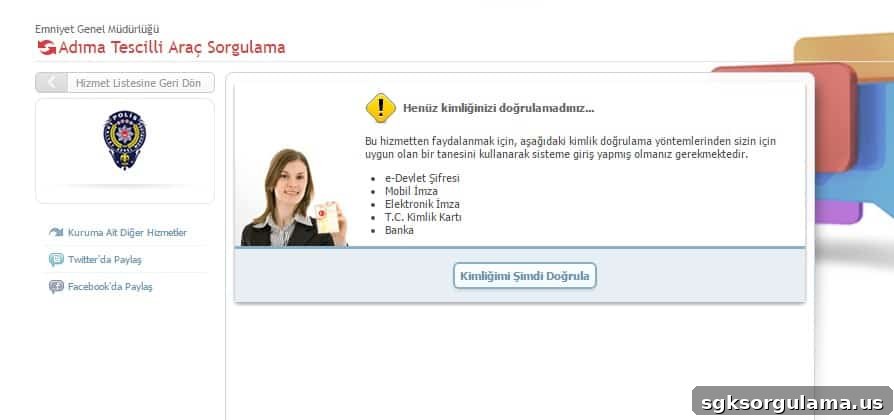
Afterward, you will see a page prompting you to verify your identity. Click the “Verify My Identity Now” button and log in using your national ID number and e-Devlet password. Once logged in, you can perform a vehicle registration query. If a vehicle is registered in your name, you can view the vehicle details on that page.
This is how vehicle registration queries are carried out. Through the e-Government application you can perform many other inquiries easily using only your national ID number and e-Devlet password.