
With the e-Devlet pension query, you can access detailed payment information related to your pension. Querying through e-Devlet saves retirees the trouble of visiting the SGK or their bank in person. Through the e-Devlet pension query you can view payments as well as any deductions.
To query on e-Devlet you need an e-Devlet password. If you do not have a password, you can log in using internet banking credentials, your national ID card, e-signature, or mobile signature. After logging in, the query process is straightforward. The e-Devlet mobile application can also be used for access.
You can also track other retirement-related procedures via e-Devlet. You can follow up on retirement application steps or check your retirement date and related information directly in the system.
Recently, the number of people checking retirement information has increased. Millions retired through the EYT regulation and the monthly pension assignment for new retirees is ongoing. New retirees can use e-Devlet to find out when their pensions will be activated.
4A Pension Query
4A pension query provides access to monthly pension details for those insured under the 4A status. You can monitor pension payments and related information this way. The term 4A refers to contributors insured under SGK.
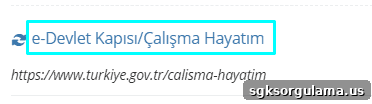
After logging into e-Devlet with your password, go to the “Çalışma Hayatım” (My Work Life) section to view retirement-related details.
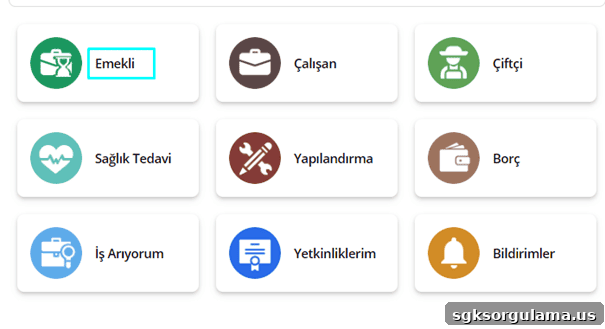
From the “Çalışma Hayatım” section, click the area labeled “Emekli” to access specific retirement information.
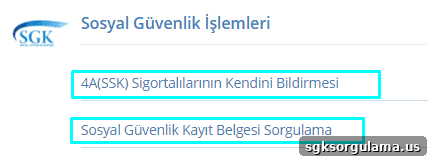
This area is where 4A-insured individuals can view their records and request social security registration documents.
Monthly pension payment amounts are not always shown directly in this section. Non-retired contributors can use “Çalışma Hayatım” to learn when they will be eligible for retirement. This section displays total premium payment days and insured service time.
It also shows how much time remains until retirement conditions are met, allowing workers to estimate when they will be able to retire. Other employment-related details are available here as well.
From the debt section you can see any premium debts. Those with outstanding premiums may be able to use restructuring options to pay off debts and become eligible for retirement. To retire, any outstanding debts must be settled in full.
Beyond restructuring, optional insurance contributions, maternity credit, or military service credit may be used when conditions allow to complete entitlement requirements.
4B Pension Query
For a 4B pension query, log in to e-Devlet and use the search field. Type “4B emekli maaşı sorgulama” to reach the related page.
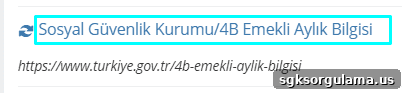
From here, those under the 4B (BAĞ-KUR) status can access pension payment information and deductions. If you want to receive information by SMS, you must register your phone number with SGK.
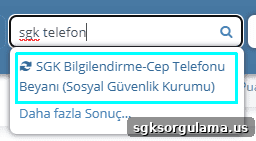
In e-Devlet, search for “SGK Telefon” to update your phone number. On the following screen enter your mobile phone and click “Güncelle” to confirm the registered number.
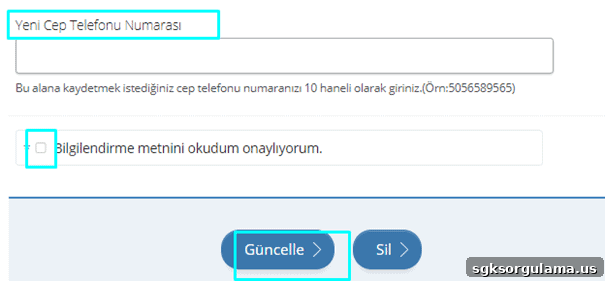
Once a new number is registered, you can receive pension payment details by SMS. The e-Devlet mobile app can also be used to manage retirement-related transactions.
4C Pension Query
4C pension query requires searching for “4c emekli aylık bilgisi” in the e-Devlet search field. Pensioners under the 4C classification, which corresponds to Emekli Sandığı, can access their monthly and deduction information here.
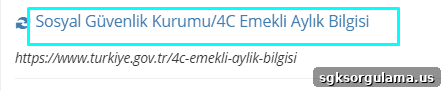
The retirement systems applied to 4C pensioners differ from those for 4A and 4B. Factors such as coefficients and additional indicators are used when calculating 4C pensions.
e-Devlet Pension Query
To access e-Devlet pension queries, visit turkiye.gov.tr or use the mobile application. After opening e-Devlet, click “Giriş Yap” (Log In) to sign in.
After logging in, type “Emekli maaşı” into the search field and select the option that corresponds to your retirement status:
- SSK contributors should choose the 4A pension information option.
- BAĞ-KUR contributors should choose the 4B pension information option.
- Those retired from Emekli Sandığı should choose the 4C pension information option.
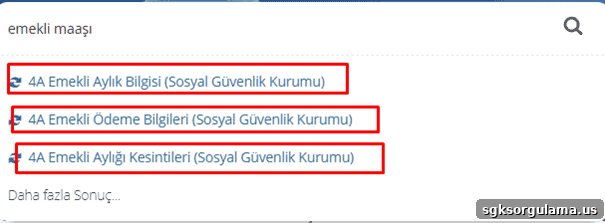
After the query, you will see several options such as monthly pension, pension payment details, and pension deductions—select the option that matches your need.
Querying Pension with Only T.C. Number
Querying a pension using only your T.C. identity number is not possible. In addition to your identity number, you need an e-Devlet password. This combination allows the e-Devlet pension query to be completed.

In addition to monthly payment details, you can query daily pension payments. For this, select “Sosyal Güvenlik Kurumu/Emekli Günlük Ödeme Sorgulama”.

The Social Security Institution reclaims pensions that remain inactive for 12 months. Banks return inactive pension funds to SGK after 12 months. You can check these funds under “Hareketsiz ve Blokeli Emekli Maaşı Sorgulama”.
Accumulated Pension Query
For accumulated pension inquiries, contact your bank. Banks block and return funds from accounts that remain inactive for 12 months, so pension payments should be moved or withdrawn periodically to avoid return. Those who receive pensions through PTT must also monitor the inactivity period—otherwise funds are returned to SGK and must be reclaimed by submitting a petition to SGK.

For more details on accumulated pension inquiries, consult your bank or the relevant SGK guidance.
Ziraat Bank Pension Query
Ziraat Bank pension query can be performed by visiting ziraatbank.com.tr and selecting “Internet Branch.” Then choose “Bireysel” (Individual) to log in.

Enter your T.C. identity number and password, then click “Devam” (Continue). If you do not have a password, use the “Şifremi Unuttum” (Forgot Password) option to create a new one.

You can perform the same steps via Ziraat Bank’s mobile application or by visiting a branch. Bank staff can assist with pension inquiries using your identity number.
PTT Pension Query
To query a pension through PTT, go to pttbank.ptt.gov.tr and log in under “Bireysel.” Enter your identity number or customer number and your password, then click “Devam.” If you don’t have a password, select “Yeni Şifre Al” to obtain one. You can also visit a PTT branch and provide your identity number to an attendant for assistance.
Can You Query Pensions Abroad?
Pension queries for abroad are available for certain countries. Payments to Germany and Bulgaria can be checked via e-Devlet by searching for “Almanya Emekli Ödemeleri” or “Bulgaristan Emekli Ödemeleri”.
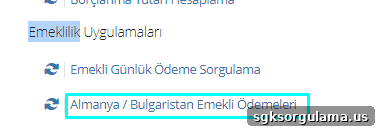
For countries other than Germany and Bulgaria, e-Devlet does not currently support direct pension payment queries.