

Sometimes even small errands that we cannot find time for because of a busy work schedule used to require standing in long lines at government offices for hours. When those offices were government-related, you also had to take business hours into account. Some tasks were completed after long waits; others were postponed to the next day. With advances in technology, these transactions can now be completed quickly and conveniently. The banking sector also offers practical solutions for many of these needs. Instead of going to a branch for transfers, currency exchange, or EFT transactions, you can use ATMs or the banks’ online services. Online banking requires a few simple steps and is much faster than traditional methods. One institution offering reliable online services is PTT Bank. With a solid history and trusted reputation, PTT Bank has earned customers’ confidence, and many people feel comfortable managing their money there. For routine needs, you can use the online services PTT Bank provides.
PTT Bank Online Services
As with most banks, PTT Bank allows customers to complete many common transactions in just a few clicks and minutes. You can use widely available ATMs, but online banking is an even easier and more convenient option. PTT Bank supports transfers such as havale and EFT, and one of the most frequent actions customers perform is checking account balances. Visiting an ATM for a quick balance check wastes time, so you can easily perform this task through online banking. All you need is an internet connection; with a few clicks you can complete your transactions from home or anywhere with access.
PTT Account Balance Check
Checking your PTT account balance has become a common request. To do this online, visit PTT’s official website and click the “Online Transactions” button located in the top-right corner. From the options that appear, select “PTT Internet Banking.” You will then be taken to the login screen. Initially a login menu appears on the left; if you choose the “TC Identity No” option, a different login screen will appear on the right.
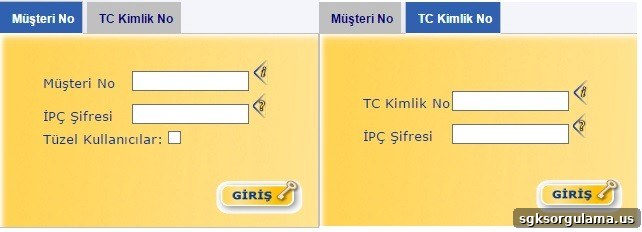
At this point, you can log in using either your customer number or your Turkish Republic ID number. Enter the correct information and click the “Login” button to access your account. Once logged in, you can perform balance checks and other online operations as needed. The same balance-check function is also available at PTT ATMs: insert your account card into the ATM, enter your PIN, and select the balance inquiry option to view your account details quickly and securely. If you prefer mobile convenience, you can download the PTT Bank app to your smartphone and use it to complete balance checks and other transactions even faster.
PTT Internet Banking
To access PTT Internet Banking, use the bank’s official online portal. The web interface provides secure login options and a clear menu for checking balances, transferring funds, and managing your account. Whether you choose ATM, web, or mobile app access, PTT Bank’s online services make everyday banking tasks faster and more convenient without the need to visit a branch.