

Vehicle casco and insurance inquiries via e-Devlet can be completed in seconds through separate pages designated for natural persons and legal entities. The Insurance Information and Monitoring Center (SBM) inquiry services on e-Devlet require your e-Devlet password to access.
If you do not have a password, you can obtain one from the nearest PTT branch and then use your Turkish ID number and e-Devlet password at https://turkiye.gov.tr/ to perform a e-Devlet vehicle casco and insurance inquiry.
Where Can Vehicle Casco and Traffic Insurance Be Checked?
Vehicle casco and traffic insurance checks can be performed through both physical and digital channels. Policyholders can obtain policy details and claims information from their insurer’s agencies or via online and mobile channels.
In recent years, the Insurance Information and Monitoring Center (SBM), which aggregates records from all insurance companies, has provided policy and claims queries through its Sigortam 360 services and has migrated most insurance policy inquiries to e-Devlet. SBM keeps online services for claims, replaced parts, vehicle details and uninsured periods active while integrating key queries into e-Devlet.
What Vehicle Information Is Available on e-Devlet?
The vehicle information accessible via e-Devlet includes:
- Traffic and casco insurance details
- Fines and outstanding debts related to the vehicle
- HGS and OGS passage records
- Inspection (muayene) and exhaust emission records
How to Check Vehicle Casco on e-Devlet?
Vehicle casco inquiries on e-Devlet are provided under separate sections for natural persons and legal entities. The free service lets you view all casco policy information and the coverage details defined in the policy.
Natural persons can perform a casco inquiry on e-Devlet as follows:
- Open the query page via sbm-kasko-police-sorgulama/.
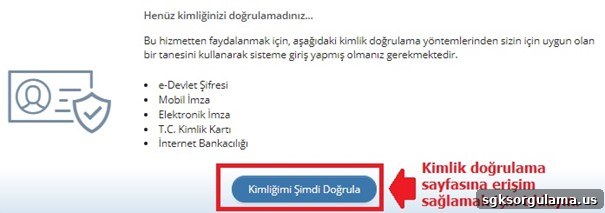
- To continue, complete identity verification by clicking the “Kimliğim Şimdi Doğrula” button on the page that opens.
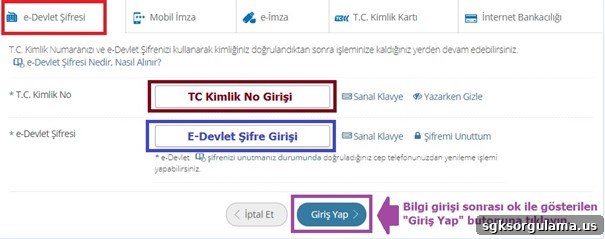
On the e-Devlet login page, choose “e-Devlet Password” as your authentication method and enter your Turkish ID Number and e-Devlet password, then click “Login.” You may also sign in using Mobile Signature, e-Signature, National ID Card, or Internet Banking.
After verification, on the query page enter your vehicle plate number into the field highlighted in purple as shown in the example and click “Query” to complete the casco policy inquiry.
Legal entities can access casco policy details on e-Devlet by following these steps:
- Open sbvgm-kasko-police-ve-hasar-bilgileri-sorgulama-tuzel-kisi/.
- Click the “Kimliğimi Şimdi Doğrula” button.
- Select a login method and enter the requested credentials, then click “Login.”
- After login and redirection, you can directly view casco policy and claim details. This action must be performed by authorized company representatives; a sample screen for third-party queries is shown below.
How to Check Traffic Insurance on e-Devlet?
Traffic insurance information on e-Devlet is available free of charge using your e-Devlet password and Turkish ID number. Vehicle casco and insurance inquiries are provided in separate sections for natural persons and legal entities.
Natural persons can query insurance by plate as follows:
- Open sbm-trafik-police-sorgulama/ to access “Traffic Policy and Claim Information Inquiry (Natural Person).”
- Click “Kimliğimi Şimdi Doğrula” to continue.
- On the e-Devlet login screen enter your Turkish ID number and e-Devlet password and click “Login.”
- Enter your vehicle plate in the field framed in orange and click “Query.”
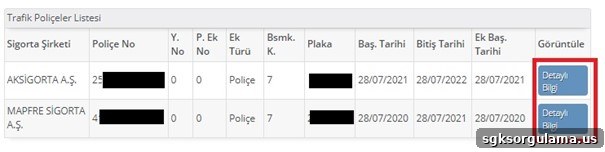
After the query, all insurance policies registered under your name for that vehicle are displayed. To view details for a specific policy, click the “Detailed Information” button located at the far right of the table.
Legal entities can perform traffic insurance queries as follows:
- Access sbm-trafik-police-sorgulama-tuzel-kisi/ for “Traffic Policy and Claim Information Inquiry (Legal Entity).”
- Click “Kimliğimi Şimdi Doğrula” to initiate the required e-Devlet login.
- Complete login using e-Devlet password, mobile signature, e-signature, internet banking or National ID Card to view traffic policy details for vehicles registered to the company you represent.
How to Check Vehicle Inspection (Muayene) Information on e-Devlet?
Vehicle inspection inquiries on e-Devlet are available under the Ministry of Transport and Infrastructure services as “Barcode Vehicle Inspection Report Inquiry.”
- Open udhb-barkodlu-arac-muayene-raporu-sorgulama/ to reach the query page.
- Click “Kimliğimi Şimdi Doğrula” to continue to the e-Devlet login screen.
- Enter your Turkish ID number and e-Devlet password and click “Login.”
- Select which vehicle’s inspection details you want to view. To check inspections for vehicles registered in your name, choose “I want to query the inspections of vehicles registered in my name” and click “Continue.”
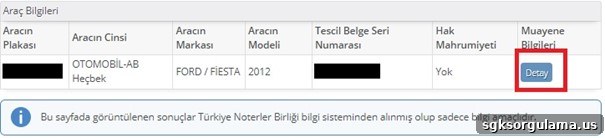
After completing the steps, you can view inspection details for vehicles registered to you. To see full inspection information, click the “Detail” button shown on the right side of the results table.
- Legal entities can perform this query at https://turkiye.gov.tr/ulastirma-ve-altyapi-barkodlu-arac-muayene-raporu-sorgulama-tuzel-kisi/.
How to Check Exhaust Emission Measurement on e-Devlet?
Exhaust emission measurement records are available on e-Devlet under the Ministry of Environment, Urbanization and Climate Change as “Exhaust Gas Emission Measurement Inquiry.” Separate pages exist for natural persons and legal entities. Natural persons can follow these steps to query emission measurements:
- Open csb-egzoz-gazi-emisyon-olcumu-sorgulama/.
- Click “Kimliğimi Şimdi Doğrula” to continue.
- Log in using your e-Devlet password and Turkish ID number.
- Select the query type. To check emissions for your own vehicles, tick the “My Vehicles’ Exhaust Gas Measurement” checkbox, choose the vehicle plate in the dialog and click “Continue.”
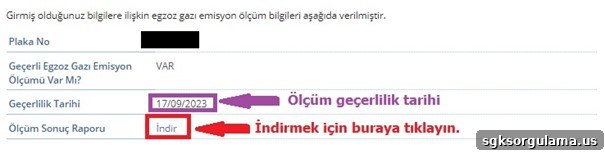
The results show whether a measurement exists and its validity date. You can download the report by clicking the “Download” button.
Where to Check Casco and Insurance by Plate?
Plate-based casco and insurance queries are available free on e-Devlet. Enter the vehicle plate and follow the steps described above. To perform e-Devlet vehicle casco and insurance inquiries you need your Turkish ID number and e-Devlet password. If you do not have a password, you can obtain one at the nearest PTT branch for a small fee.