

With the rise of internet use today, you can handle many financial and tax-related tasks online. Conducting these transactions online saves you a trip to the office and lets you complete them quickly without dealing with unnecessary paperwork. One of the services available is tax debt inquiry. You can track your up-to-date tax debts through the Internet Tax Office system provided by the Revenue Administration. The system also lets you view information about various liabilities such as tax debts, court fees, and administrative fines. Using this service, you can easily monitor outstanding debts and avoid additional charges like late payment interest by taking action early. Regularly checking your tax debts helps prevent larger problems later. After viewing your tax debt, you can securely pay any balance by credit card through the same system. Read on to learn the steps required to quickly check and, if you wish, pay your debt.
How to Perform a Tax Debt Inquiry
Performing a tax debt inquiry via the Internet Tax Office provided by the Revenue Administration is straightforward. By entering the requested information accurately, you can complete the inquiry. Click the link provided below in this article to access the system. After opening the page, you will need to follow a few steps. You will be asked to enter your national ID number and the serial number of your identity card. Then, as indicated on the page, you must enter either the national ID number of your mother, father, spouse, or child (any one of them), or the first and second letters of your mother’s maiden name. Next, enter the characters shown in the security verification image. Finally, review the information you entered and click the “OK” button.
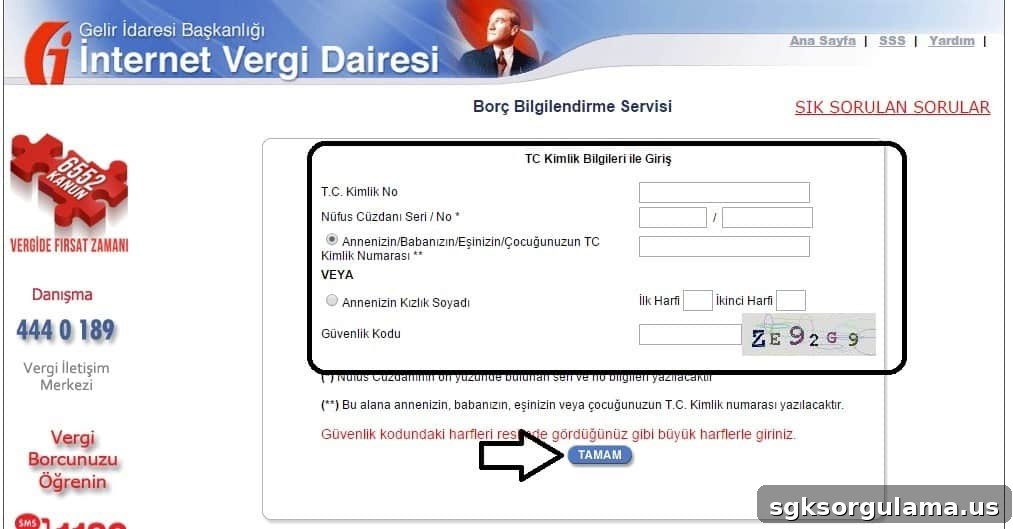
If you complete these steps correctly, your tax debt inquiry will be finalized and you will be able to view current liabilities.