
Many people wonder how to temporarily deactivate or permanently delete their Instagram accounts when they want to step away from social networks. Instagram, which has reached around one billion users worldwide and continues to grow thanks to features from social interaction to e-commerce, offers options to disable an account temporarily or remove it permanently. Users can perform Instagram account deactivation or deletion through a web browser or the mobile app.
WHAT DOES DEACTIVATING OR DELETING AN INSTAGRAM ACCOUNT MEAN?
The terms “deactivate” and “delete” on Instagram are often confused. If you want to take a temporary break from Instagram, you should follow the steps for “temporarily disabling your Instagram account” or “freezing your Instagram account.” If you want to leave the platform permanently, you need to follow the steps for “permanently deleting your Instagram account.”
HOW TO TEMPORARILY DISABLE (DEACTIVATE) YOUR INSTAGRAM ACCOUNT
Temporarily disabling your account is the right choice for a short break. If you prefer a pause instead of permanently leaving the platform, you can complete the deactivation process from the account disable page reached via Instagram settings.
Steps to temporarily disable your Instagram account:
- Open https://www.instagram.com/ in a web browser or launch the Instagram mobile app to reach the sign-in page.
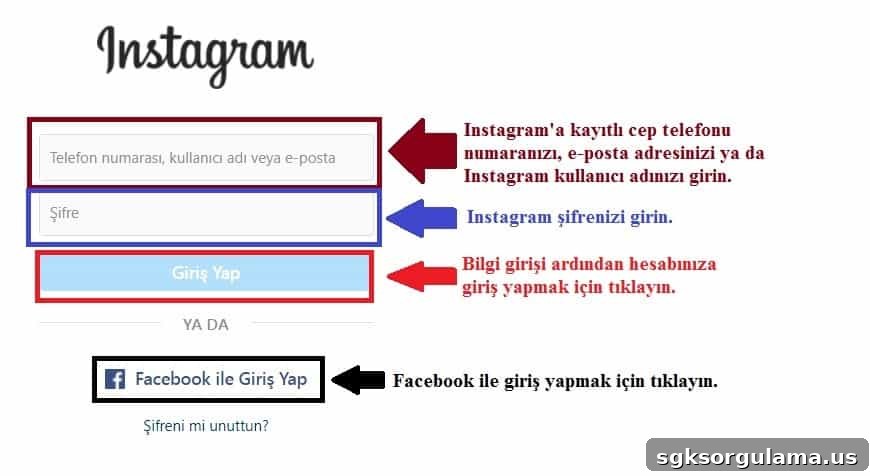
- On the sign-in page, enter your phone number, username, or email and your password, then click “Log In.”
- Go to your profile page.
- Click the “Edit Profile” button near the top of your profile.

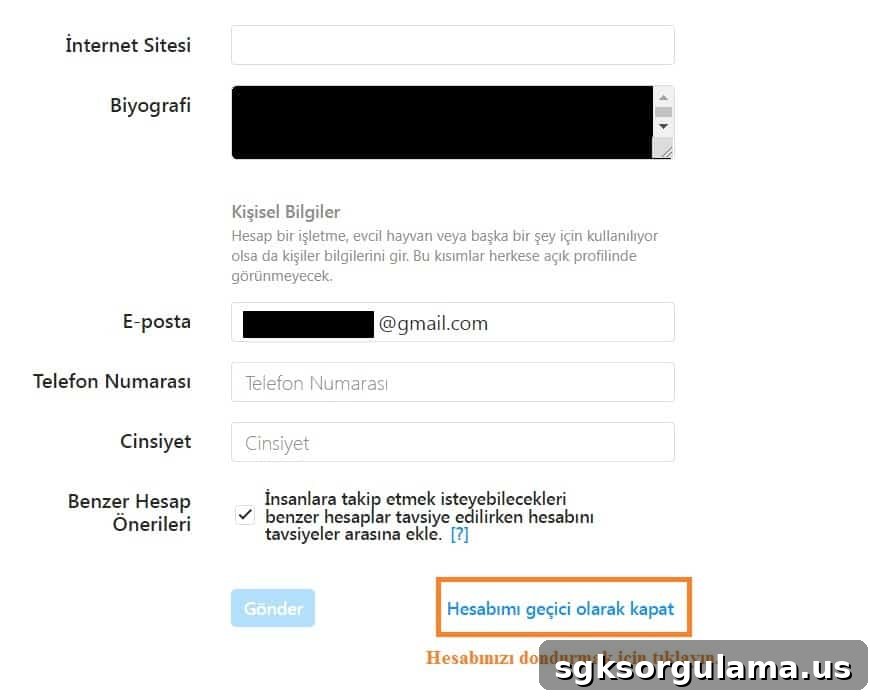
- At the bottom of the Edit Profile page, click “Temporarily disable my account.”
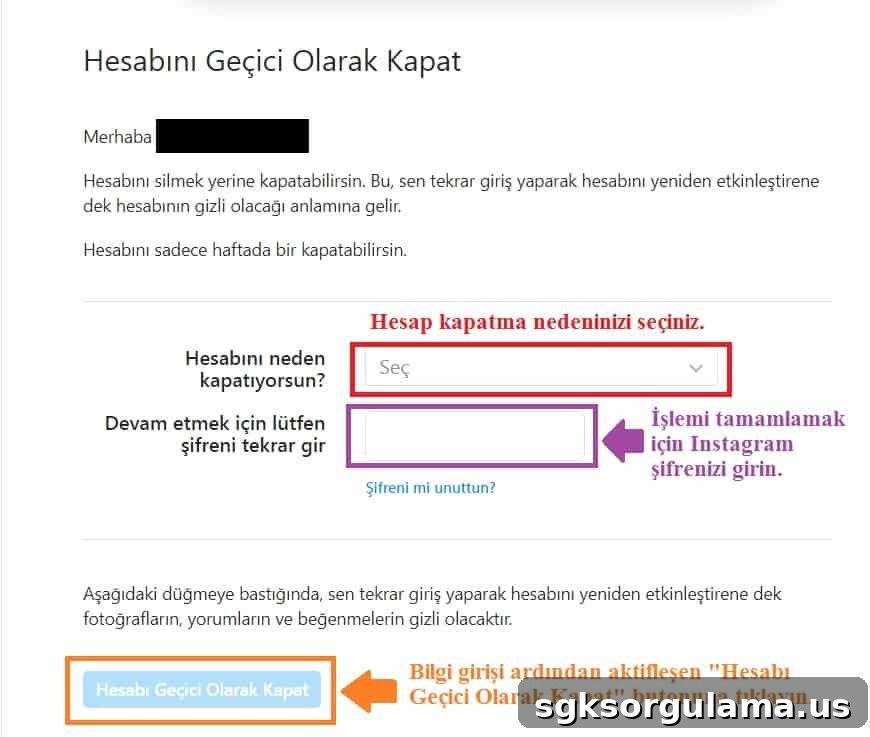
On the next page, choose a reason for disabling your account from the “Why are you disabling your account?” menu, enter your password in the required field, and then click “Temporarily Disable Account” to complete the deactivation.
Link to Temporarily Disable Instagram Account
The direct link to disable an Instagram account takes you to the account deactivation page. You can reach the page shown in the images above by using Instagram’s official account disable URL.
HOW OFTEN CAN YOU DISABLE YOUR INSTAGRAM ACCOUNT?
Instagram enforces a cooldown period: once you disable your account and then reactivate it, you must wait at least seven days before you can disable it again. In other words, you can deactivate your account no more than once every seven days.
HOW TO DELETE YOUR INSTAGRAM ACCOUNT PERMANENTLY
Deleting your Instagram account is intended for users who want to leave the platform permanently. If you previously deactivated your account and decide you no longer want to return, you can proceed to permanently delete your account. Both deactivation and deletion require you to specify a reason for leaving Instagram.
Steps to permanently delete your account:
- Open the account deletion page provided by Instagram.
- From the dropdown menu highlighted in the image, select the reason for deleting your account. If none of the listed options match your reason, choose “Something else.”
- After selecting a reason, enter your password in the field shown and click the confirmation button to submit the account deletion request.
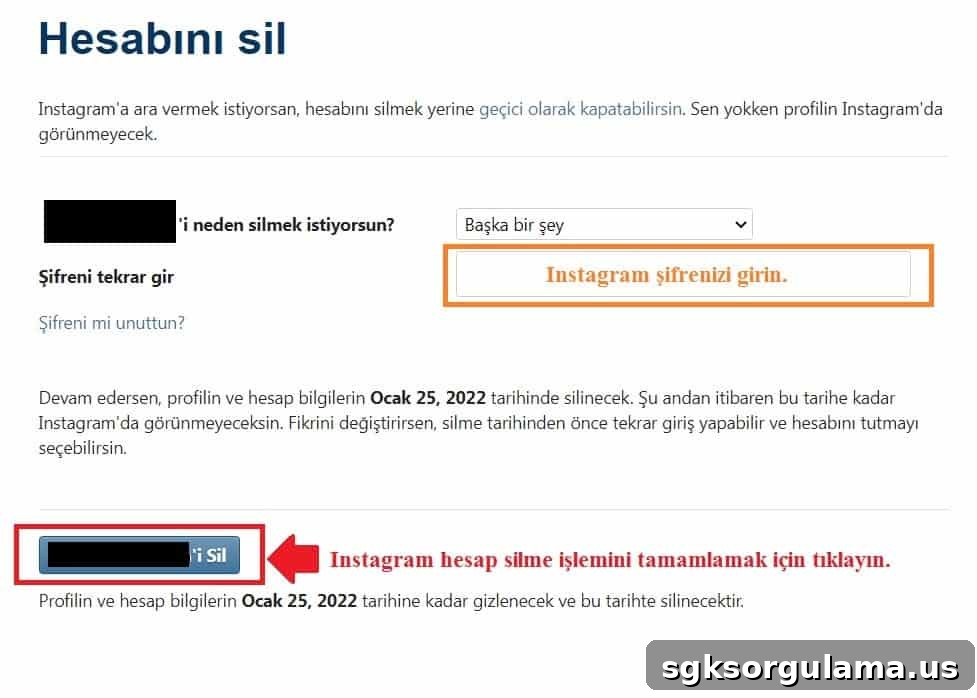
- After completing the deletion steps, Instagram begins the removal process. If you change your mind, you have a limited window to cancel by logging back in.
IS MY ACCOUNT DELETED IMMEDIATELY?
No — deletion is not immediate. Instagram provides a 30-day grace period after you submit a deletion request. If you log into your account during that period, the deletion request will be canceled and your account will remain active.
CAN A DELETED INSTAGRAM ACCOUNT BE RESTORED?
You can restore a deleted account within 30 days by logging back in. If you do not access the account within this 30-day window, the account and its content will be permanently removed and cannot be recovered.
CAN SOMEONE ELSE USE THE SAME USERNAME AFTER DELETION?
A username from a deleted Instagram account cannot be immediately claimed by another user or reassigned to a different account during the deletion process. In practice, the username tied to a deleted account is not available for immediate reuse.
SHOULD I DELETE OR DISABLE MY INSTAGRAM ACCOUNT?
Whether to delete or temporarily disable your Instagram account depends on your personal goals. If you want a short social media detox or a temporary break, disabling your account is usually the better option. If you are certain you do not want to return, permanent deletion removes the account and all its content from the platform.
Remember: after you request deletion, you have 30 days to change your mind by logging in. If you do not log in within that period, the deletion becomes permanent and all posts and memories are removed. To avoid an irreversible decision, consider deactivating your account first. If, during the break, you find no reason to return, then you can proceed with permanent deletion.
CAN I DELETE MY ACCOUNT IF I FORGOT MY PASSWORD?
You cannot delete an Instagram account without your password. Both deactivation and deletion require you to enter your password. If you forgot your password, use the “Forgot password” option on the Instagram login page to reset it. Follow the password reset instructions sent to your registered email to create a new password, then proceed with deactivation or deletion.