

Public service is a heavily promoted career path in our country. Because of regular working hours, state security, and other benefits, millions of high school, associate degree and bachelor’s graduates take the KPSS exam each year to pursue civil service positions. However, not all civil servants start from the same level, and their educational backgrounds before starting work vary. If all civil servants received the same salary regardless of position or education, that would be unfair. To prevent such inequality, the civil service uses a system of grades (derece) and steps (kademe). In this system, three steps equal one grade. A civil servant’s initial grade and step are usually determined by their education level at appointment, and these grades and steps change over time as they continue to work. Below you can also find the answer to the question: what are the requirements for grade and step advancement.
What Are Grade and Step in Civil Service?
Grades and steps for civil servants are related to their education before appointment and their years of service after appointment. Step advancement means an increase in salary without any change in the responsibilities or importance of the position. Grade advancement means a move to a higher hierarchical level and a corresponding salary increase. Civil servants typically earn one step for each year worked, and by gaining three steps they can advance one grade. For example, a civil servant who graduated from a four-year university typically begins service at 9/1. In that notation, 9 is the grade and 1 is the step. When this person completes the first year, the step becomes 9/2, and after three years they may advance one grade to 8/1.
What Are the Requirements for Step Advancement?
There are two basic conditions for a civil servant to advance a step. First, the civil servant must have worked at least one year in the current step. Second, there must be a higher step available to advance to. When the required period in the step is completed, the step advance occurs automatically and no additional action is usually required. However, certain prior periods such as legal internship or preparation education at middle or high school level may be credited as step time. To request such credited time, you must submit a petition to your employing institution in the format required by that institution.
Additionally, civil servants who have no disciplinary sanction for eight years are granted an extra step advancement as an incentive for maintaining good conduct. Also, civil servants working in provinces prioritized for development — such as Adıyaman, Bayburt, and Kars — receive an extra step advancement every three years in addition to normal step progression.
How to Learn Your Grade and Step
If you want to learn your grade and step, you can consult the grade/step table provided below. If you work under the 4C status within the Retirement Fund (Emekli Sandığı), you can also view your grade and step through the e-Government (e-Devlet) system. For this, you will need an e-Devlet password, which you can obtain easily from PTT with your identity card.
Salary Difference from Step Advancement
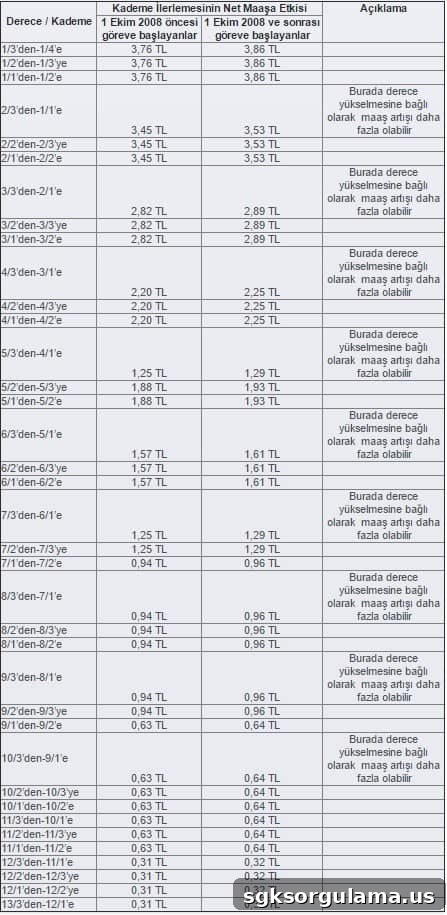
Because civil servants’ salaries depend on their grade and step, these factors matter for earnings. Although larger salary increases occur with grade advancement, step advancement also produces a difference in pay. You can see the salary difference from step advancement in the table below.
Sample Petition for Step Advancement
If you need a petition template to request credited service time or to document step advancement matters, prepare a formal petition addressed to your employing institution following the institution’s petition format and submit it to your human resources or personnel office.
Check Your Grade and Step via e-Government
If you are registered under the relevant social security or employment status, you can check your current grade and step through the official e-Government portal using your e-Devlet credentials. Obtain your e-Devlet password at a PTT branch and log in to view your employment records.